AWS Cloud Security

Going to Vegas for the Amazon Re:Invent event is one of the best ways to learn about Cloud Computing and Cloud security. And the second best of course is to just browsing the slide decks or videos of the event, from your office or home. So here you go, fresh from the Internet, the course 206 of the security track – “Security of the AWS Cloud”.

And don’t forget to follow up with the slide decks of “AWS Cloud Security” and “Security and Compliance”

To cloud or not to cloud ?

If you ask the above question to the various cloud services providers, I am sure their answers are “Definite yes”.

If you ask the same question to end users, their answers may end up like “I really don’t care.”. And for the question again to business owners, their answers will probably are “May-be’s” because seriously no one really reveals all the cloud benefits, implementation pros and cons to them.

To IT professionals, however, we will probably provide a vague answer – “It depends.”. The long form of the answer is – “It depends on the maturity of the cloud market, technology and whether the solution available today can match your budget, quality requirements, and expected service level. More importantly, whether cloud technology and solutions can help your company to improve competitive advantage.”

That’s exactly what Cloud Security Alliance (CSA) and Information Systems Audit and Control Association (ISACA) did in a recent survey to answer part of the question – what is the maturity of the cloud technology and market, now ? A collaborative project by CSA and ISACA , the Cloud Market Maturity study provides business and IT leaders with insight into the maturity of cloud computing.

The study also reveals that cloud users in 50 countries were least confident about the following issues (ranked from least confident to most confident):

  1. Government regulations keeping pace with the market (1.80)
  2. Exit strategies (1.88)
  3. International data privacy (1.90)
  4. Legal issues (2.15)
  5. Contract lock in (2.18)
  6. Data ownership and custodian responsibilities (2.18)
  7. Longevity of suppliers (2.20)
  8. Integration of cloud with internal systems (2.23)
  9. Credibility of suppliers (2.30)
  10. Testing and assurance (2.30)

None of these findings are really a surprise, I suppose, however it is important to conduct such project because it helps us to understand how the cloud market will change over time, and how it advances from infancy to full maturity.

Do check out the press release and the full report to understand more about the findings, or you can check out the following infographics – the whole report in one picture.
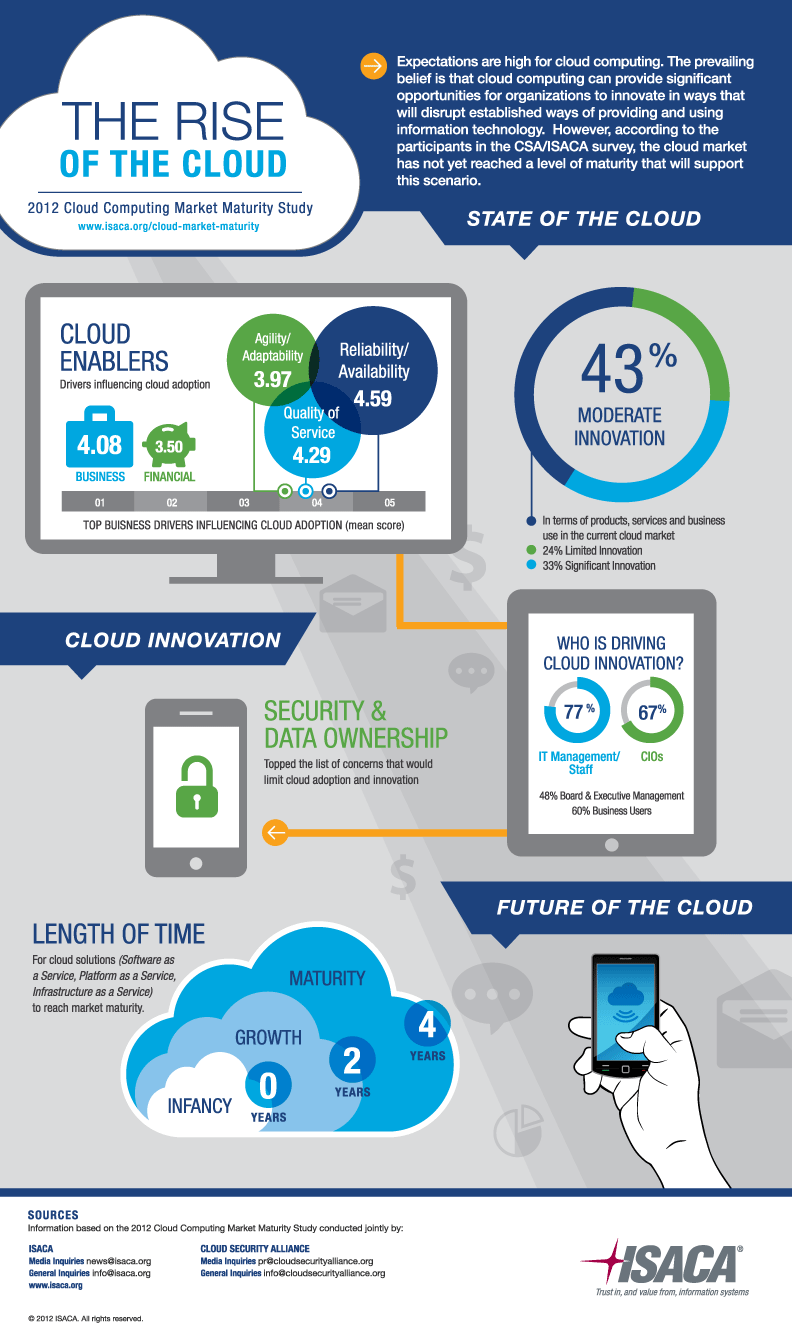

Cloud-Computing-Infographic-large

Log My Life

Back in the early 1980s’ when I was a Fortran programmer, it’s a doctrine to document every programs with very detailed comments. Roll forward 15 years, then when I developed the very first homepage of my own in year 1995, I started to log down the changes of my own website and showed those in the front page, with an aim to inform my site visitors the details of the website changes. And gradually, the “logs” included not only website changes, but also news, jokes, events, photos, videos and opinions.

As you may all know, these change logs (Web Logs) later was named as Blog (coined by Peter Merholz, who jokingly broke the word “weblog” into the phrase “we blog”) in year 1999.

And now I no longer develop programs (except some twists on scripts and PHP programs), but more and more, I am logging my life within the Internet … like a lifelogger but without those geeky devices.

Like it or not, every single day we are logging our lives with dozens of modern day Internet tools and social networks. I did a check lately and found that indeed I am sharing bits and pieces of my life one way or the other, every single day. And treating myself as a use case, here are the tools and services you can use to log your life if you want to, insanely …

  1. Start your usual day with the app Zite (or Flipboard) for iPad and start sharing your selected Internet, eCommerce, Media and Security news to Buffer (Buffer is a service to schedule your social sharings, highly recommended).
  2. For some more important news that shall not be “buffer-ed”, immediately share to social networks like Facebook, Twitter, Linkedin and Google+.
  3. Throughout the day, browse your Facebook wall and Twitter tweets (with TweetDeck) to see what news you can further share to your friends and followers.
  4. For each place you visit in the day, check-in to FourSquare and take a photo with an aim to share it later to social networks, with or without touch-ups by Instagram. If time permits, record this in the beautiful app Path. In case you will forget where you’ve been, say two years later, you can subscribe to Memolane service to remind you.
  5. Whenever you see some good photos (food, pet, fashion, scenery etc. etc.), “pin” it with Pinterest tool. And for good articles and slides, save it to Dropbox for future reference.
  6. What about books ? Read your ebooks with Kindle and whenever you encounter a good line, share it to Facebook and Twitter again. Of course, don’t forget to tell your Linkedin connections what book you’re reading with the Amazon module.
  7. Then for the slides created in public speeches or presentations, share those though Slideshare. In addition, publish your own “social newspaper” thru Glos.si. And if you want your friends to get a printed copy of your sharings in Facebook, publish it through Yearlyleaf.
  8. With all these social interactions, closely monitor your Klout score to see whether your shall share, tweet and “like” even more …
  9. And about your work, document your career history in Linkedin, VisualCV and Vizify.
  10. Last but not least, keep your views and master pieces in your blog like this tiny little one

So, are you ready to log your life ?

writing

Free Facebook Timeline cover images

Since the launch of Facebook Timeline, we all look for good Timeline cover images. First of all, one needs to check the size of that image, and we all know it is 800 x 315 pixels. Then we all look for good photos / images that fit this size to download. The trouble is, an 800 x 315 pixels image may or may not be a good image to use. Reason being Facebook will automatically scroll up the Timeline a little bit after a few seconds. And in turn only 800 x 200 pixels of the cover image is shown.

So, here you go, 8 free Facebook Timeline cover images that look good not only in full resolution, but also after the Timeline scrolled up. All these photo images are free because all are taken by me. Check it out, download, enjoy and hope you all like those !!

Manage your social media sharing with Buffer

Same as many of you, everyday (especially in the morning) I read lots of Internet news, blog posts, and tweets. If I find any good ones, I like to share it with my friends in Facebook and Google Circle; my followers in Twitter; as well as my peers in Linkedin. With so many to share and so many different social media networks as the destinations, it is not easy to manage this task. For examples:

  1. I need to log-in to these websites one by one to post. Yes, there are some utilities to help out but none of those are really intuitive;
  2. If I post all the morning stuffs in one go, it not only annoys all my friends and followers; but all my posts also will disappear in my friends’ wall easily;
  3. Browser is no longer the primary way to read / share news, therefore there is a need to share also directly from apps like Flipboard and Zite;

Then I came across a very neat solution – the Buffer. Buffer let you first, with a centralized dashboard, create a queue for each of your social networks. And then you can create posts to put into those queues.

Then those posts in the queue will be posted orderly to the designated social network automatically according to a sending schedule. For example in the following screen you will find that I have created four sending times for my Linkedin network.

These two features alone, have solved the first two issues above. The next problem to solve is how to share your posts from other apps. Buffer created Chrome Extension, Safari Bookmarklet (for your iPad and iPhone) and even a special secret email address such that you can send your post to the queues via email.

Lastly, Buffer even includes an analytic screen to let you see how your posts perform – e.g. number of click-thru and retweets etc.

All in all, it is a very good tool to manage your sharings. If you are serious about social media sharing, I suggest you to give Buffer a try and it is the best solution for now.