The city government portal site

So after the operation, I need to follow a strict diet for next few months. As part of the excellent services, there were two dietitians explained to me the details, with an information sheet to summarize what I can and cannot eat during this period.

Then, my parents passed me another information sheet from another source , with similar diet information but some minor variations. So I thought that gotta be something in the web with up-to-date information, especially from our city’s Health Department … so where shall I start with my smartphone ?

First, I tried to guess the Health Department website address but failed (I still am not sure why the city government like to use so many un-user-friendly department short form). Then I surfed to the so-call city government’s portal site (the url is easy to remember, not because it is easier to guess but purely because of the recent advertisements) to see whether it helps.

Oh, the site could not detect the source of the visit, so it still display the splash screen with wide graphic in my smartphone (why we need a splash screen anyway ? To generate traffic ?). The links use animated GIFs, so do not work well with the bulit-in browser … and I have to scroll a lot for everything.

Anyway, go into the “categorised” page, I tried the health, food etc. etc. but failed to find the stuff I want and yes, still a lot of scrolling with my phone’s small screen. I tried “simple layout” and other options … still, scrolling left and right, up and down …

Then I go to the search function … blank screen. Tried the advanced search function … it works but with only government news returned but not the information I wanted.

Half an hour later, I “surrendered”. Instead, a search in Google and I found everything I need in http://www.drgourmet.com

So far, the only good stuff with the city portal is its simple url.

Complimentary Breakfast … not included

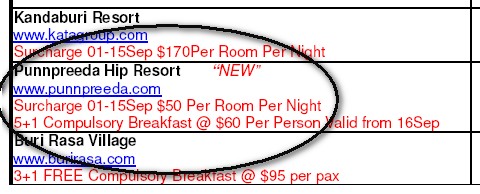
Once in a while, I receive emails about some special hotel deals and today I received one about some new hotels in Koh Samui, Thailand. “Great !!” I thought, I need more sunshine and rests … so let’s see what’s included in those new hotel packages …

Compliementary Breakfast

Oh … Compulsory Breakfast … I better prepare for it …

Worldmate 2007

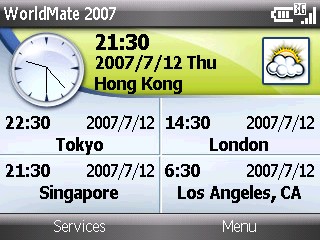
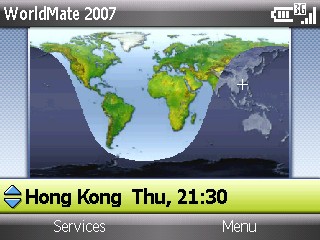
MobiMate‘s Worldmate software is one utility software that I will install to any phone and PDA I use. So obviously, I bought the latest Worldmate 2007 once I got my Dopod C730. Unfortunately, the Worldmate 2007 did not work with this latest generation of smartphone – I just could not get the subscription working.

So after exchanging a dozen emails among Handango, MobiMate and me, they finally solved my problem. And here is some screen shots of that great utility.

World Clock

World Map

Satelite Map

Handshake

I finally found one more good benefit of getting old – that is, you can no longer hold your camera steadily and you can buy a new camera with build-in image stabilization (IS). So … after the Panasonic FX-30, I bought the first Olympus DSLR that comes with IS – Olympus E-510.

Being a Olympus fans, it’s the third DSLR in my arsenal, after the legendary E-1 and E-300. We were all told before that E-1 and E-300 are compact DSLRs, but E-510 is definitely smaller – incredibly small with so many features inside it. See the following beauty E-510 and the beast 50-200 zoom …

E-510

Sample pictures in future blog posts.

User Experience – Frequently Ignored Answers

You know, many sites implemented a section named – Frequently Asked Questions. I reckoned before that you only need this section because the site is not easy to use or understand and therefore you need pages and pages to explain the details. And the questions in most cases are not “asked” by the site users / customers; but by the developers, marketing “gurus” and the site owner. In other words, kinda useless.

But then I figured we cannot ignore the fact that many dumb users / customers thought they are smart-ass and try to do funny things with a website – for instance, I have users argued with me many times why they need to use their public digital certificates to do a digital signing … go figure.

So I think, why not set up a page in your site named – F.I.A., Frequently Ignored Answers ? In this page, there are no frequently asked questions, just a bulleted list of stupid answers … for examples,

  • You see black on your monitor, because you have not switched it on yet.
  • Yes, your ISP bill may be expensive, but we cannot “switch off” or “shut down” the Internet for you.
  • Your PC will still get infected if you don’t install anti-virus software … just don’t blame us.
  • Your PC is not working not because you visited our site, but your kid installed a game last night. Don’t call our Call center.

Now I feel good, I created an acronym by myself. F.I.A.