Better Audio For Your WFH Video Conferencing – Part 1

Nowadays we do video conferencing all the time during Coronavirus lockdown with Microsoft Teams, Zoom, Webex, Google Meet. You may wonder if it is possible to improve the audio quality during the conference meeting, if you’re not happy with your computer built-in microphone.

You can of course attach an external microphone to your computer, mobile phone and camera. This post shares how you can do it with your laptop computer (in this post, Macbook Pro), iPhone, DSLR camera (Olympus E-M1 Mark III) with an 3.5 mm external microphone. The next post will share with you how to do it with an USB based external microphone with your computer and mobile phone.

There are many good external microphone that makes use of the 3.5 mm plug. The one I show here is the BOYA BY-MM1 Shotgun Video Microphone. The BY-MM1 is compact, light weight and housed in aluminium. It also includes an anti-shock mount,which can effectively reduce unwanted vibration, cable and handling noise. Lastly, it includes a furry windproof shield, which specially used for minimizing the wind and environmental noise for outdoor recording.

To make it work with your computer, iPhone and Camera, there are some tricks however:

  1. For laptop, just plug in the cable comes with BOYA to the 3.5 mm plug of the computer. For some reasons, I tried both the TRS and TRRS cables with the microphone, both work perfectly.
  2. For iPhone, you however need Apple Lightning to 3.5 mm Headphone Jack Adapter.
  3. One point to note for this computer and mobile phone set up if you want to use it to record audio, make sure you unplug the microphone then you can replay the audio clip with the built-in speaker. You can of course plug in your preferred headphone / earphone for that as well.
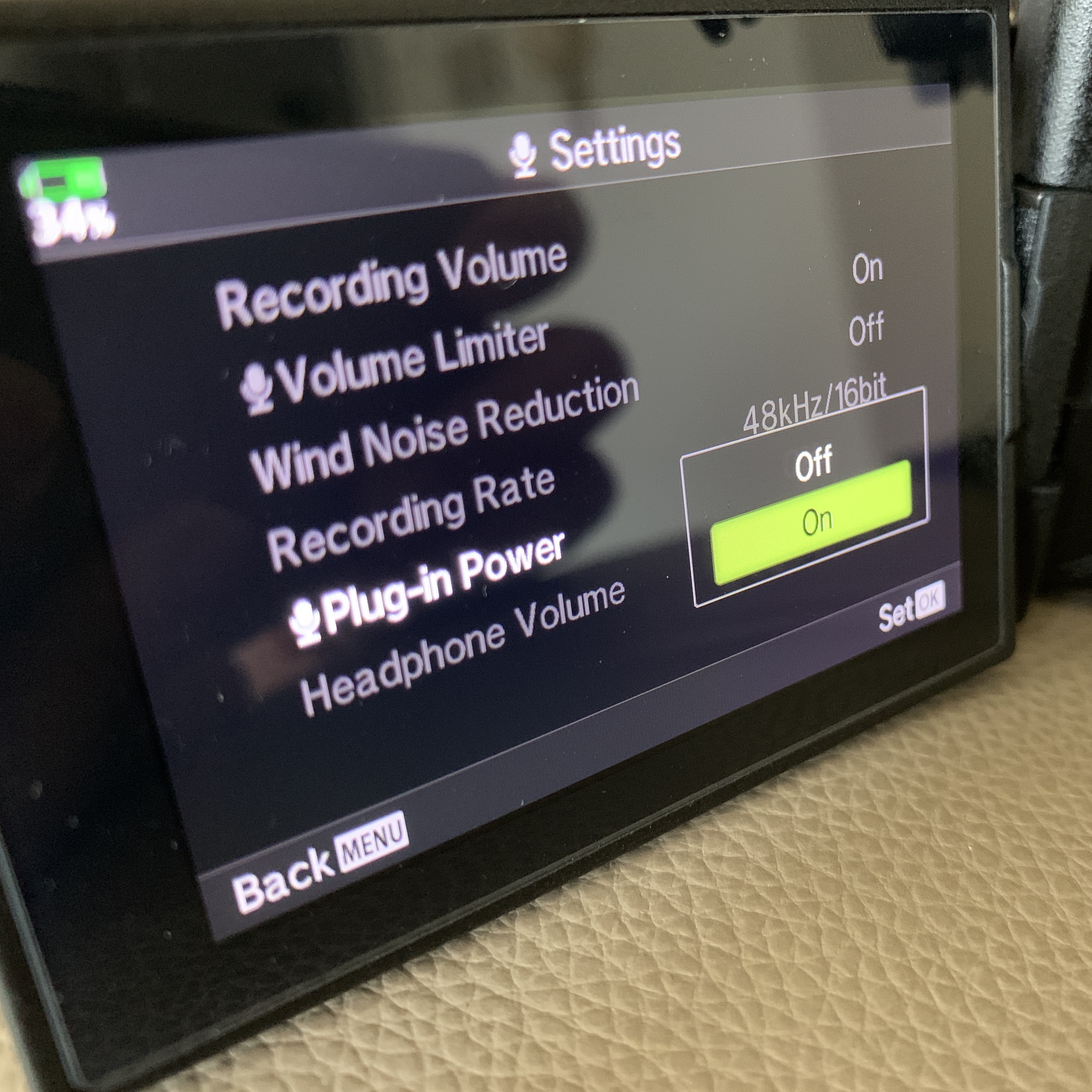
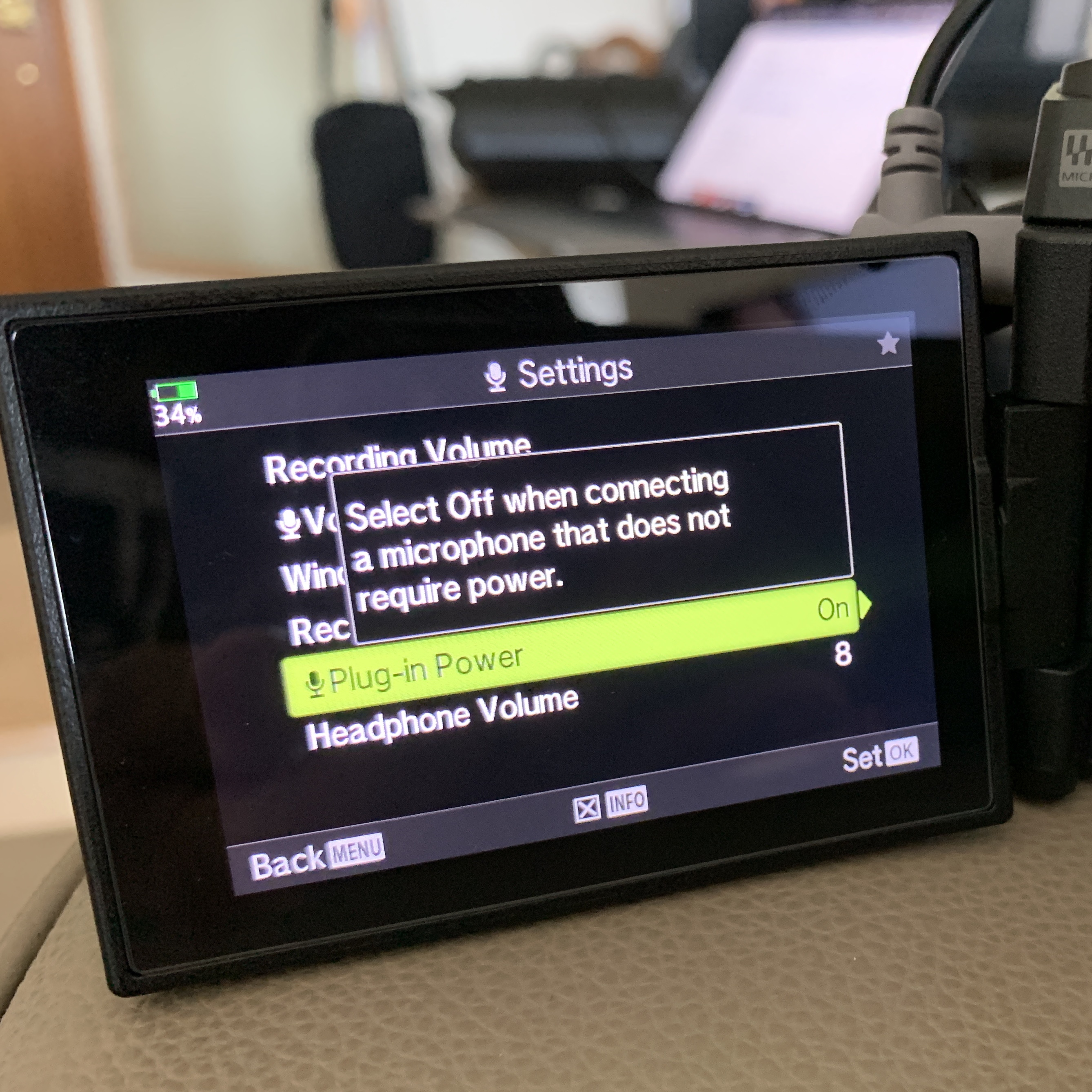
  4. For camera, also just plug in the cable to the 3.5 mm jack with the camera. However, since there is no battery with the microphone, you need to set up your camera to provide power to the microphone.

Here are some pictures of the microphone and setup !!

7 Habits of Highly Effective WFH People

Get ready for a conference call

So in this part of the world, many of us need to work from home (WFH) because of the Coronavirus disease. Naturally, work from home / remote is very different from working in the office.

There are many online information about working from home but mainly focuses on the best conference tools in the market. From my point of view however, other than good conference tools, one actually needs a few other techniques and habits to make the whole WFH exercise effective, and ultimately less “conference call fatigue”.

Here are the 7 habits that can make your work more effective:

1. Have a Working Mood and Setting Up a Proper Workplace

Highly effective people will not work from home in pajama. Instead, they will change to casual wear (formal attire is a bit strange …) before they start working. The working mindset and mood is important.

In addition, find a place or corner at home to make it your workplace. Understand it is not easy if your home is not very spacious and you have your partner, parents, kids and pets around while you’re working. Therefore if needed, find a coffee shop nearby to setup your proper workplace.

In my case, I also set up my workplace with a stand-up desk, some background music (through a Spotify playlist) as well as a cup of hot black coffee.

2. Equip Yourself with Good Tools

There are many tools in the market good for conference meetings – e.g. conference tools like Zoom.us, Microsoft Teams, WebEx and collaboration tools for whiteboarding, mind-mapping, drawing, remote desktop, document sharing etc.

Select only a limited set of tools, within your company budget and don’t over-complicate the technology.

3. Preparation of Conference Calls

Send out invitation email to all attendants with meeting agenda, joining methods – conference call tool and dial up number etc. Also note the meeting time if your attendants were from different time zones, therefore a link to timezone website will be useful.

Send an reminder email to ask the attendants to install the conference software and mobile app beforehand.

More importantly, ask the attendants to test the video, microphone, share screen function to see how it works before joining the meeting.

4. Running a Good Conference Calls

Greet the attendants one by one, so they know they joined the call successfully and aware of other attendants.

Ask the attendants to find the mute button of the tool and mute it for the moment.

When it’s time to start the meeting, inform the attendants how you’re going to run the meeting, when will be the right time to ask question and the order to ask questions – e.g. one by one, or team by team.

Then run your meeting, according to the agenda. If you need to ask your attendant questions, make sure you start with the name of the attendant and remind him or her to unmute before answering the questions.

Wrap up your meeting with a verbal summary, follow-up actions and a thank-you to all attendants.

5. Post Conference Call Actions

After the conference meeting, send out an email with the summary, and follow-up actions, to all attendants.

Collect the feedback of the conference / collaboration tools.

Help the attendants to fix any connection and tools installation issues.

6. Tracking Tasks Status

Your usual way to track task status may not work anymore (e.g. Kanban board in the office), again some file sharing and online project monitoring tools will make the team’s life a lot easier.

7. Lastly, Keep Yourself Fit

Work from home also means you no longer need to walk to public transport, or carpark; you won’t walk around in the company; and you won’t walk to lunch. In essence, you exercise less if you work from home.

Therefore, instead of walking around, you shall find time throughout the day to walk, jog, or exercise in gym.

With the same token, you shall also spare some time to read, to join some online courses … as I believe you won’t want to join hours of conference meetings every single day.

In Summary

Hope these 7 habits help you a bit to make the WFH exercise more effective. If you know other good habits and tools, let me know.

Good Bye, Professor Clayton Christensen

I’ve been a big fan of Clayton Christensen’s works for almost 20 years now, and it’s really sad to learn about the news two days ago. I learnt a lot from his books and his HBX MOOC online course on Disruptive Strategy.

If you’re interested in Disruptive Innovation, Jobs-to-be-done, living a rewarding life, some unreserved recommendations –

“The first thing is to look at disruptive technology as a growth opportunity and not as a threat …”, Clayton Christensen

John Lamparski/Getty Images

Blockchain Resources

You can tell the Blockchain space is maturing, when you find that there are so many research papers, books, reports, and slide decks published by big consultancy companies, financial institutes, research firms and of course, geeks.

Here is a list of the resources that I think you may find useful.

History, Whitepapers and videos

  1. Blockchain Glossary (Cognizium)
  2. Blockchain Resources (Cognizum)
  3. Brief History of Bitcoin
  4. Bitcoin: A Peer-to-Peer Electronic Cash System (Satoshi Nakamoto)
  5. Ethereum: A Next-Generation Smart Contract and Decentralized Application Platform (Vitalik Buterin)
  6. Libra: White Paper
  7. 33 Cryptocurrencies described in four words or less
  8. Smart Contracts (Visual Capitalist)
  9. Banking on Bitcoin (Youtube video)
  10. The Rise and Rise of Bitcoin (Youtube video)
  11. Trust Machine : The Story of Blockchain (Vimeo video)
  12. Decentralized Society: Finding Web3’s Soul (E. Glen Weyl, Puja Ohlhaver, Vitalik Buterin)

Books and Miscellaneous Resources (via Kindle)

  1. Blockchain: Down The Rabbit Hole: (Discover The Power Of The Blockchain)
  2. Mastering Bitcoin: Programming the Open Blockchain
  3. Blockchain: Transforming Your Business and Our World
  4. Blockchain for Dummies (IBM Limited Edition)
  5. Blockchain and the New Architecture of Trust
  6. Blockchain Resources (The Blockchain Knowledge Test)
  7. Block Kong: 21 Entrepreneurs and Financiers Leading Blockchain in Hong Kong
  8. The Blockchain Innovator’s Handbook

Research Reports

  1. Capturing the Value of Blockchain (BCG)
  2. Blockchain and the General Data Protection Regulation (European Parliamentary Research Service)
  3. Inclusive Deployment of Blockchain for Supply Chains: Part 3 – Public or Private Blockchains (World Economic Forum)
  4. Building Value with Blockchain Technology: How to Evaluate Blockchain’s Benefits (World Economic Forum)
  5. Building Block(chain)s for a Better Planet (World Economic Forum)
  6. Central Bank Digital Currency Policy Maker Toolkit (World Economic Forum)
  7. Realizing Blockchain’s Potential (KPMG)
  8. Business Blockchains (Deloitte)
  9. 2019 Global Blockchain Survey (Deloitte)
  10. Blockchain, a catalyst for new approaches in insurance – Part 1 (PwC)
  11. Blockchain, a catalyst for new approaches in insurance – Part 2 (PwC)
  12. Security Token Offering : What, where and how (PwC)
  13. Establishing Blockchain Policy (PwC)
  14. Guidance on Cryptoassets (FCA)
  15. What’s next in Blockchain 2019 (CBInsight)
  16. Where’s Blockchain headed next (CBInsight)
  17. Blockchain Technology Overview (NIST)
  18. Blockchain – Opportunities for Private Enterprises in Emerging Markets (IFC)
  19. Can JPM Coin Disrupt the Existing Stablecoin Market? (Binance)
  20. China Central Bank Digital Currency (Binance)
  21. Accessing Blockchain’s Business Value (Accenture)
  22. Blockchain in Action (EY)
  23. Life of a Coin (EY)
  24. Rise of Digital Money (IMF)
  25. Comparative analysis of the regulation of crypto-assets within EU and EEA countries (Blockchain Advisory)
  26. Bitcoin 2019 Investor Study (Grayscale and Q8 Research)
  27. Blockchain Now and Tomorrow (European Commission)
  28. Blockchain for Digital Government (European Commission)
  29. Libra : Understanding Facebook’s CryptoCurrency (Consensys)
  30. Global Enterprise Blockchain Benchmarking Study (University of Cambridge)
  31. Blockchain Innovation Landscape Brief (IRENA)
  32. Legal context and implications for financial crime, money laundering and tax evasion (European Parliament)
  33. Blockchain Potentials and Limitations for Selected Climate Policy Instruments
  34. Crypto-Assets and Blockchain Technology (FireEye, Circle)
  35. China Blockchain Report (Forkast Insight)
  36. What Are Stablecoins (CBInsight)
  37. How Blockchain Could Disrupt Banking (CBInsight)
  38. Build Back Better: Digital Updates for Today’s Challenges (GBBC Annual Report)
  39. Blockchain : The India Strategy (NITI Aayog)
  40. 2021 State of U.S. Crypto Report (Gemini)
  41. Digital Asset Revolution (Blockchain Research Institute)
  42. 2022 Digital Asset Outlook (The Block Research)
  43. Blockchain – Legal & Regulatory Guidance (The Law Society, UK)
  44. State of Blockchain 2021 (CB Insights)
  45. The 2022 Crypto Crime Report (Chainalysis)
  46. Blockchain Security – A Framework for Trust and Adoption (Dutch Blockchain Coalition)
  47. Blockchain Framework and Guidance (ISACA)
  48. Cryptos on the Rise 2022 (Thomson Reuters)
  49. GameFi: Can blockchain based gaming redefine the industry? (Cointelegraph Research)
  50. Decentralised Finance (DeFi) (EUBlockchain)
  51. Decentralized Autonomous Organizations: Beyond the Hype (World Economic Forum)
  52. Ethereum Business Readiness Report 2022 (Enterprise Ethereum Alliance)
  53. Bitcoin : Beyond the base layer (The Block)
  54. An Introduction to Smart Contracts and Their Potential and Inherent Limitations (Harvard Law School)
  55. Stablecoins : Coinbase Whitepaper (Coinbase Institute)
  56. State of Blockchain Q2 2022 (CB Insights)
  57. 2022 Year Review and 2023 Year Ahead (Crypto.com)

Blockchain Use Cases

  1. Blockchain Building Blocks: Creating a world of opportunity for insurance from an evolving area of technology (The Institutes – Risk and Insurance Knowledge Group)
  2. Making Blockchain Real – LVMH and the future of authentic luxury (Certilogo)
  3. Blockchain meets Energy (FSR Energy)
  4. Real World Applications of Blockchain Technology (Zage)
  5. Blockchain for Development (GSMA)
  6. Blockchain Revolution in Education and Lifelong Learning (Blockchain Research Institute)
  7. Tokenized Securities & Commercial Real Estate (MIT Digital Currency Initiative)
  8. Industry Report : Blockchain in Real Estate (Fibree)
  9. Blockchain for Agriculture (FAO)
  10. Blockchain and Digital Identity (EU Blockchain)
  11. Blockchain in Travel (Amadeus)
  12. DLT in the Supply Chain (UCL CBT)
  13. Blockchain for Good (Accenture)
  14. Opportunities for Blockchain in Loyalty (Collinson)
  15. Decentralized Identity (Microsoft)
  16. Gateway for Sustainability Linked Bonds (HSBC)
  17. Tokenization of Accounts Receivable on Blockchain
  18. Blockchain in Commercial Real Estate (Deloitte)
  19. Blockchain for Social Impact (Stanford Business)
  20. Digital Voting using Blockchain (Tokend)
  21. Blockchain Explained (Blockchain Australia)
  22. Blockchain meets the Stock Market (EDC)
  23. Blockchain Solutions in Pandemics (BRI)
  24. Blockchain and Cyber Security (EU Blockchain)
  25. Blockchain for Wine Industry
  26. Blockchain In Logistics (DHL Trend Research)
  27. Real Estate STO Whitepaper (Deloitte)
  28. The Blockchain Ethical Design Framework (beeckcenter)
  29. Central Bank Digital Currency : An Innovation In Payments (R3)
  30. Blockchain Applications in the Healthcare Sector (EUBlockchain)
  31. Regulating Crypto (S&P Global)
  32. Blockchain @ Media (Deloitte)

NFT, Metaverse and Web 3.0

  1. A-Zs of Non-Fungible Tokens (Breaker)
  2. NFTs In The Spotlight (EY)
  3. NFTs Redefining Digital Scarcity (Kraken Intelligence)
  4. NFTs Quarterly Report Q2 – 2021 (Nonfungible.com)
  5. NFT Market Safe Practices Guide (Nonfungible.com)
  6. NFT Engaging Today’s Fans in Crypto and Commerce (Visa)
  7. The Metaverse – Web 3.0 Virtual Cloud Economies (Grayscale)
  8. Demystified NFTs (EUBlockchain)
  9. State of the Open Metaverse 2021/22 (Outlier Ventures)
  10. Metaverse Canon – Reading Guide (Medium – Jon Radoff)
  11. Meet me in the Metaverse (Accenture)
  12. Opportunities in the Metaverse (JP Morgan)
  13. Framing the future of Web 3.0 (Goldman Sachs)
  14. State of the NFT Market (Forkast)
  15. Metaverse and Money (Citi)
  16. Fitness NFT, Metaverse (OliveX)
  17. Navigating the NFT Mania – An Introductory Guide (Soh Wan Wei)
  18. NFTs’ Path to Primetime (UTA)
  19. A Guide to the Transformative Power of Virtual Reality and Mixed Reality (VARJO)
  20. The Corporate Hitchhiker’s Guide to the Metaverse (BCG)
  21. Chinaverse (Fabernovel)
  22. Owner Relationship Management Whitepaper (SAYL)
  23. The Metaverse Overview: Vision, Technology, and Tactics (Deloitte)
  24. Metaverse and Money (Citi)
  25. The Metaverse, Blockchain, Gaming, and NFTs : Navigating the Internet’s uncharted water (NewZoo)
  26. MetaFi : DeFi for the Metaverse (Outliers Ventures)
  27. State of Web3 Report (The Chainalysis)
  28. Blockchain for the Metaverse: A Review
  29. Value Creation in the Metaverse (Mckinsey)
  30. Exploring the Metaverse and what it could mean for you (Deloitte)
  31. Future of Extended Reality (KPMG)
  32. 2022 Resortverse Whitepaper (Ape Digital)
  33. The Metaverse, Blockchain Gaming, and NFTs 2022 (Newzoo)
  34. A Web 3.0 Guide For Brands (ANDREA LORINI)
  35. Web3.0 & Metaverse : A Playbook for Unlocking Opportunity in the Decentralised Economy (IET)
  36. WHAT TO WATCH IN WEB3 – 8 Trends for Enterprises in 2023 (VaynerX)

Youtube Channel

  1. 99Bitcoins – https://www.youtube.com/channel/UCQQ_fGcMDxlKre3SEqEWrLA
  2. Blockchain at Berkley – https://www.youtube.com/channel/UC5sgoRfoSp3jeX4DEqKLwKg
  3. Boxmining – https://www.youtube.com/channel/UCxODjeUwZHk3p-7TU-IsDOA
  4. Coin Bureau – https://www.youtube.com/channel/UCqK_GSMbpiV8spgD3ZGloSw
  5. Whiteboad Crypto – https://www.youtube.com/channel/UCsYYksPHiGqXHPoHI-fm5sg
  6. č²”ē§‘ęš—ęˆ° – https://www.youtube.com/channel/UC-tHPfxMbXkM099YxK8pjmw

From Notepad to Wix ā€¦

… and Blogger, Plog / Lifetype, PostNuke, DocuWiki, WordPress in between.

It’s been 24 years since I hosted my own website (you can find the history here), and one lesson I learnt is there are always better tools out there to develop your own website. Even though professionally I use other enterprise software to build websites and applications, I reckon you can always learn more by using other tools or platforms to build your own website.

While I use WordPress to build / host my personal website (yes, you’re reading this – michaelyung.com), I moved my photo website, 80days.com, from WordPress to Wix. I don’t exactly know why I made the move as WordPress served me pretty well to host my photos. However, the idea of trying something new pushed me to evaluate other options and eventually I settled with Wix.

The first thing I learnt from Wix was the tool is beautifully implemented, and the next was there were too many options, settings that it would take anyone a long time to complete a site. You will also need to understand a whole different set of vocabulary, before you know what you’re doing. You can control the locations of the elements on the page, pixel by pixel … and therefore you will likely spend many long hours to make your website looks perfect, pixel by pixel.

In summary, Wix is great for design focus websites, but shall you do it to move websites to the Wix ? Not likely, if the WordPress site is already serving you well.