Facebook photo album image size

Are the pictures in your Facebook album all look blurry, or out-of-focus ?

The reason is simple, your pictures are not optimized to be displayed in Facebook. Even though nowadays’ digital cameras can capture very high resolution pictures but you shall not upload your full-size pictures to Facebook album straightaway. That requires Facebook to resize the pictures to fit their page layout, and makes your pictures look blurry.

In fact, the optimal size for pictures in Facebook album is 604 pixels high (or wide). Therefore, before you upload the pictures to your newly created album in Facebook, try first resizing the picture to 604 pixels wide or high. Then, use the sharpening tool or unsharp mask within your image editing tool to sharpen the pictures. Lastly, upload those processed pictures to the album.

Update 1 : From January 20th 2010, Facebook has upgraded their photo album feature to support 720 pixels high (or wide). So if you have fast Internet connection, then why not resize the photos to 720 pixels and share those with your friends ?

Update 2 : From 2nd October 2010, Facebook upgraded their photo album to support upload of photos with 2,048 pixels. In addition, the site rolled out new uploader, friend-tagging feature and lightbox based viewer.

Update 3 : From end August, 2011 – now Facebook can display the photos up to 900 pixels (you can upload photos with bigger size, but it will downsize it to 900 pixels to display).

Update 4 : Just in case you are searching for this … the new Timeline Cover image / photo size is 850 x 315 pixels.

Update 5 : From March, 2012 – Facebook  upgraded the photo viewer application to support a full-screen view up to 2048 by 2048 pixels, the maximum upload size for users. However, the upgraded view will only work in recent versions of Firefox and Chrome. Users can open up the full-screen view by clicking “Fullscreen” in the options menu beneath the photo or clicking the arrow icon at the top right hand corner of the picture to expand the size.

Update 6 : So …. Google+ also changed the profile layout, and if you want to make a cover photo just for Google+, don’t forget to resize it to 940 by 180 pixels.

Update 7 : I just prepared some Facebook Timeline cover images for you all to download and use for free. Enjoy !!

Here you go, one sample album from my Kyoto trip with my beloved Olympus camera (link to E-P3, but the photos were taken with E-510). Enjoy !!


You’re in my heart

What a great show by Rod Stewart !!

The RodFather is in town for one night only and you really have to be there to feel his energy. One really touching moment was when we all sang together the song “You’re in my heart”. In fact, the fans could not stop but kept singing the same song in the subway car back home. What a night !!

Rod Stewart Concert

Enjoy (a video from previous Rod Stewart concert) !!

Installing Harmony 1000

Being a Harmony remote controller freak for years, it’s sad to learn that my Harmony 880 is dead after 4 years of services. And since the Harmony 1100 is not available in town yet, so I decided to buy the dated Harmony 1000 as a replacement. And … what a mistake ?!

All I wanted was to transfer all my 880 setup (stored in the Internet as XML files) to the model 1000 and it took me four hours to complete the job (countless installing, uninstalling, search for solutions, restarts etc. etc.). Even though the installation process is similar for all the Harmony remote controllers, the model 1000 hardware and firmware are just too crappy. Anyway, I hope this post can help Harmony 1000 owners to install it.

First, you have to ensure that you have:

  • the latest version of the Harmony software for your PC,
  • the firmware for the controller, and
  • the activity profile (i.e. how to control your TV, amplifier, players etc.).

Getting the up-to-date Harmony software is easy- just connect to the net and it will do the upgrade. Getting the activity profile right is also a piece of cake (for me I have it created it a few years back). However, for the firmware (after you downloaded from the site), it is a lot tricky as you need to make sure your PC can connect to the remote controller and install the latest firmware to it.

I spent hours just to make it work (i.e. the PC to recognize the controller), but found the solution eventually – i.e. turn the controller into “Save mode” whenever you need to reboot the controller. And the step to do it is to hold the on/off button while you are inserting the rechargeable battery into the controller.

So, before you do anything, try turn the controller to save mode first. Then when you install the firmware or when you update the activity profile to the controller, the controller may need to reboot itself – and don’t forget also turn to save mode manually during this reboot step.

Other things you may want to check are whether you need to relax or disable your firewall / anti-virus software during the installation; whether you are using an USB port or an USB hub. Also, don’t forget to check AVForums.com, RemoteCentral.com and Logitech.com for other support information that can help solving your problems.

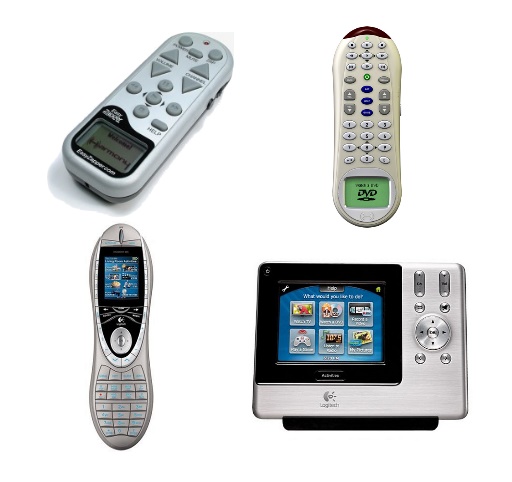
Lastly, some photos of the original Harmony Easy Zapper I bought 7 years ago, and then the rest Harmony remotes … 768, 880 and 1100. See how technology advances in the last 7 years !!

Harmony Remote Controllers

Brand yourself

Just finished a book “The Dip” and one of the key ideas evangelize by the author is about making yourself as the best in your own industry, such that you can develop your desired career – a little bit easier. I am sure it is right and nothing is impossible – but nothing is easy as well. The very first difficult thing is how to tell other people you are one of the best in your industry.

In the world of Internet, one way to advertise yourself naturally is to brand yourself in the popular social networks such as Facebook, Linkedin and Twitter. All these social networks have a profile page that you can dress it up with good information about yourself. For example, you can include your friends’ recommendations in Linkedin and your interests / groups in Facebook. Both will let your friends or potential employers understand more about you.

And for Twitter, looks like not much you can do with its simple profile page. However, inspired by Twitterbacks.com, you can actually beautify the background image of your Twitter profile and include some important information about your twits.

And, here is mine … how’s that ?

Twitter Profile

WordPress 2.7.1 upgrade

WordPress 2.7 is not new but I just managed to upgrade it two weeks ago. I have delayed this major upgrade for quite some time because you know making a major upgrade is quite a pain. You need to disable all the plug-ins, back up the database, download the software, unzip the new software, transfer to the host, then upgrade the database and software … of course, with a hope that everything runs fine. It is not a pleasant one hour, you know.

However, one major selling point to me about version 2.7 is you can now upgrade the software easily (after the above tedious step for version 2.7), that’s why I made the jump two weeks ago.

Then a couple of days ago, WordPress released the vesion 2.7.1 … oh, perfect time to test the automatically upgrade utility. Just backup the database as usual, then go to the Tools menu of the 2.7 dashboard, click upgrade option and confirm the upgrade.

15 seconds later, the upgrade is done !! Perrrrrrfect.

Wordpress 2.7