
No, it is not a typo in the title, but indeed it is what the Google G-1 ad says. So is the new Android phone really that good ? Check it out.
Tag: google
Google Android is here
Many times I ask myself “Shall I get a phone that is easy to use, or a phone that is technically excellent ?”. In other words, shall I get an iPhone or an Android phone ? Of course, now I am using an iPhone 3G and am very pleased with it. But I think everyone has to admit, the first Android phone – T-Mobile G1 is very, Very, VERY cool. It’s cool not because of the so-so hardware, but really the software itself – Android and the applications run on top of it.
Google Chrome – the next network OS ?
Probably the biggest news in recent weeks, Google launches their own browser – Chrome. They have posted the behind-the-scene information about Chrome with 38 pages of comics. Indeed, if you read the pages without knowing the software beforehand, you will probably think they are talking about building an operating system. Anyway, if you don’t have the time to read thru the 38 pages, here are some main points:
- A browser design around web applications, instead of web pages
- It needs to be stable, faster, more secure, clean & efficient user interface … and make it open source
- Make it a multi-process browser, not multi-threaded – no more browser crash just because one tab’s web page has memory leak or rendering bug …
- There is a built-in task manager such that you can eliminate some mis-behave processes, if needed.
- The beautiful part is, to me, Google can test each build of the Chrome browser by simply using their massive infrastructure to crawl tens of thousands of web pages. And they can also use the ranking of pages to test the most popular pages in the Internet …
- Webkit is the rendering engine Chrome uses, and it is fast …
- They also built a Javascript virtual machine. Instead of “interpreting” Javascript code, it generates machine code of the source. In addition, Chrome also improves the Javascript garbage collection method.
- The user interface of the browser is redesigned – now the tabs are on top. And the URL box is now the Omnibox – it shows the search suggestions, top pages you have visited and those you have not visited.
- There is a new tab page that shows the thumbnails of the 9 most visited pages.
- You can turn on the read-only mode (they call it incognitco window) and it will not save your browsing history, cookies etc.
- Each process has its own sandbox and cannot write / read files off your hard drive. No more watching your sensitive data and running malware … as soon as you close the tab, everything bad running in this tab is gone.
- Chrome runs a security model better than BIBA security model which is used by Vista.
- Chrome will warn the users of phishing and malware websites from lists Google is maintaining.
- Google also introduces Gears to help the developers to improve the capabilities …
- It is an open source project, make available for all bright developers.
So, how’s the beta version performing so far ? Not as fast as it claims … but once it loaded the page, the speed is pretty good. And the page scrolling is a bit strange … Will keep you all posted.

Google Lively
Other than the Apple iPhone 3G, the launch of Google Lively is indeed one of the hottest news this week. So just three days after the launch of the beta version, how is it doing ? Here are some good and bad things I found so far.
- I managed to download the Lively plug-in, installed it, set up my avatar, designed my first “room” and got hanging around the room within an hour. It’s better than my Secondlife experience on this.
- The plug-in runs pretty fast in Firefox 3.0 and Internet Explorer 7, and feels faster than Secondlife.
- I can set up “gadgets” easily to feed my own photos and a video feed from Youtube.
- You can embed the room into your own website, blog or Facebook account (yet to be tested, but the application is here).
- The chat messages and avatar expressions appear in rooms you visiting almost instantly.
- I can easily embedded to my WordPress blog.
Here is a screen shot of the room I created – 80 Days Cafe.
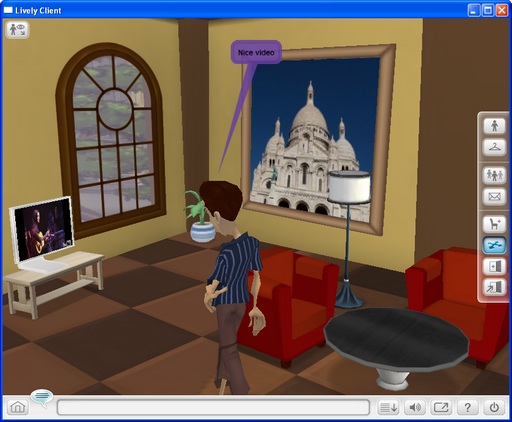
As you can see, I added …
- An avatar with new hairstyle, t-shirt and jean …
- Two red colored sofas, a coffee table, a standing lamp and one potted plant.
- A wall mounted picture frame that gets a feed from my photo album and a click to the picture will link to a website selling my photo album (neat !!)
- A LCD TV on top of a bench, with a feed from a selected video (Wicked Game guitar solo by Greg Reiter) from YouTube (neat neat !!). The sound is great as well …
And the problems I encountered are …
- Whenever I click the objects (avatar or furniture), a dialogue box pop up to let me edit the properties. However, the dialogue box keep “flashing” and I have to drag the box outside the room estate to stop the flashing. Interestingly, it happens only on my XP computer, but works perfectly in a Vista computer.
- One of my rooms disappeared after login, but reappeared later on. I suspected it is caused by the fact that I ran Lively sometimes in Firefox, and sometimes in IE.
- I don’t think there is enough items to dress up the avatar and not enough styles of furnitures. However, I believe the situation will improve later.
- There was one time the avatar “locked in” with other objects in the room, I have to use another view (toggles in the upper left corner of the room) and move the avatar away from the object.
- There is no way to stop, adjust the volume, and mute the video feed in the LCD TV gadget.
- There is no way to resize the photo frame gadget, and in fact other furnitures as well.
- [Update] Google disabled the gadget function …
All in all, not bad for a beta version. And just in case you wanna know more about the application, here is a video trailer …
 M.Y. Lessons Learnt