5 Gadgets You Should Buy Now Instead Of Later

Everyday we have lots of news about the latest gadgets from Tech blogs and social networks, and everyday we tell ourselves to wait … wait until the reviews are out, wait until the better versions are out or the prices are dropped. Yes, it’s me; but of course, YMMV.

However, there are times that I cannot wait but go ahead to buy the overpriced, not-well-tested gadgets, then find out I should have bought those earlier because the gadgets are soooooo good. And here are 5 gadgets that I think you should buy now, instead of later.

I traveled a lot and really like to have a pair of headphone that can play good music as well as cancel all the background noises. I have other noise cancellation headphones before, but the Bose QuietComfort 20i Acoustic Noise Cancelling Headphone is really the best one. This in-ear headphone is lightweight, delivers excellent sound quality, and extremely comfortable. Many times I would turn on the noise cancellation mode in busy cafe or packed subway train such that I can have some quiet time to read. If you have lots of good songs in your mobile device and like to enjoy those even in a noisy environment, this is for you.

bose-headphone

So you have a good pair of headphone with noise cancellation feature, then it’s probably about time you shall get the Kindle Paperwhite (second generation) to restart your book reading project. The screen is simply stunning, and you can read it under bright sunlight or in the dark. Best of all, your eyes will thank you as the other non-ePaper digital readers really will hurt your eyes.

Kindle Paperwhite

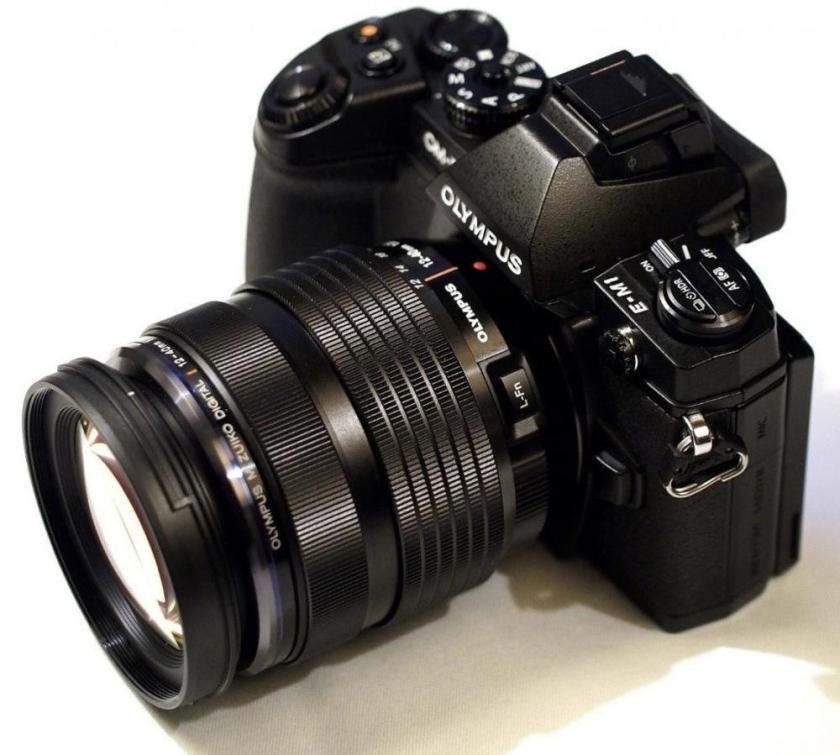
Other than a pair of headphone and a good book reader, another essential travel companion for me is a good DSLR camera. I’m never a fan of Canon, Nikon and Sony, but became a big fan of Olympus about 10 years ago (I really love their E-1). So when they released their excellent OMD E-M1 last year, I bought it without skipping a heartbeat (note that I already got the E-M5, ooops). A solid, weather-proof, and responsive camera that will never disappoint you in terms of image quality.
OMD-E-M1

Another “gadget” that travel with me all the time is the Macbook Air. It’s my work computer, research tool, programming machine and social networking platform. That’s not much you can complain about the great machine, but for me I want one more USB port – to charge my iDevices and without syncing. Yes, I can get one of those power supply plug charger, but instead of getting extra bulk I bought the Twelve South PlugBug World. It’s an All-in-one MacBook global adapter with 2.1 amp iPhone/iPad charger – perfect. And the bonus is, this world edition comes with different plugs for different countries.
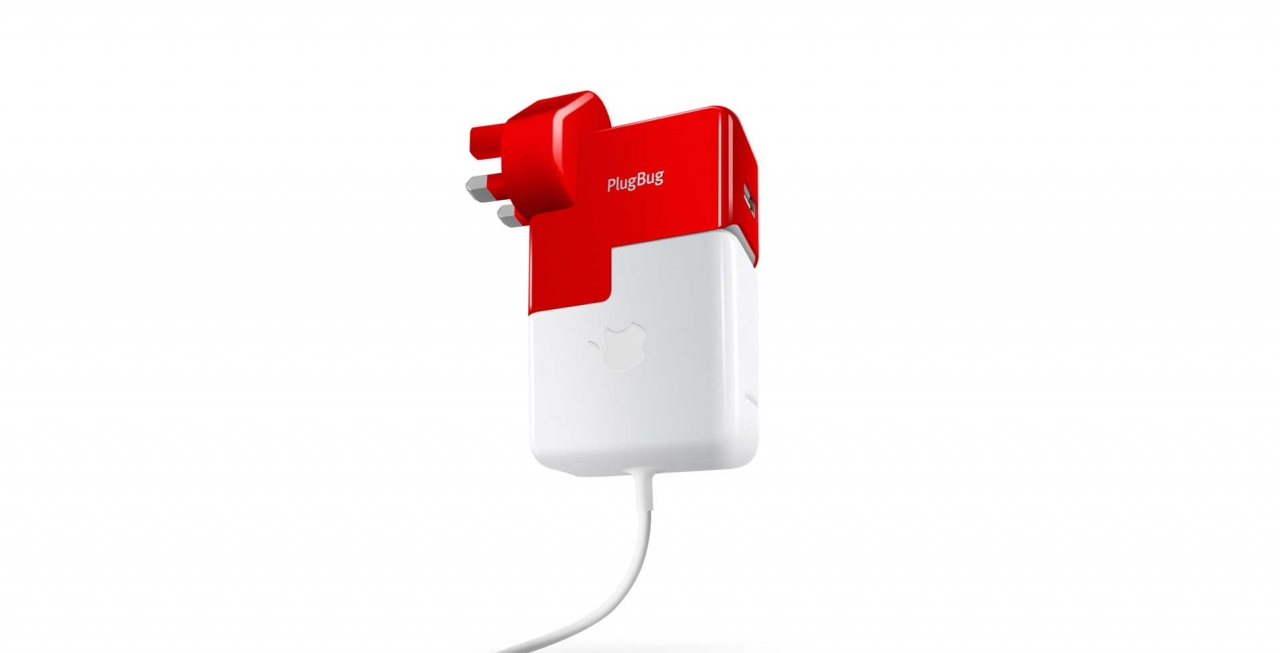
plugbug

The last gadget that I wish I had bought earlier is the MIO Alpha I. It is a watch and it is also a strapless heart rate monitor. Yes, you read it right, it is strapless (!!). In addition, it can synchronise the reading to the RunKeeper app with Bluetooth, such that the app can read out the heart rate to you during your exercise. If you like to track your heart rate while jogging or running. Get one, period.
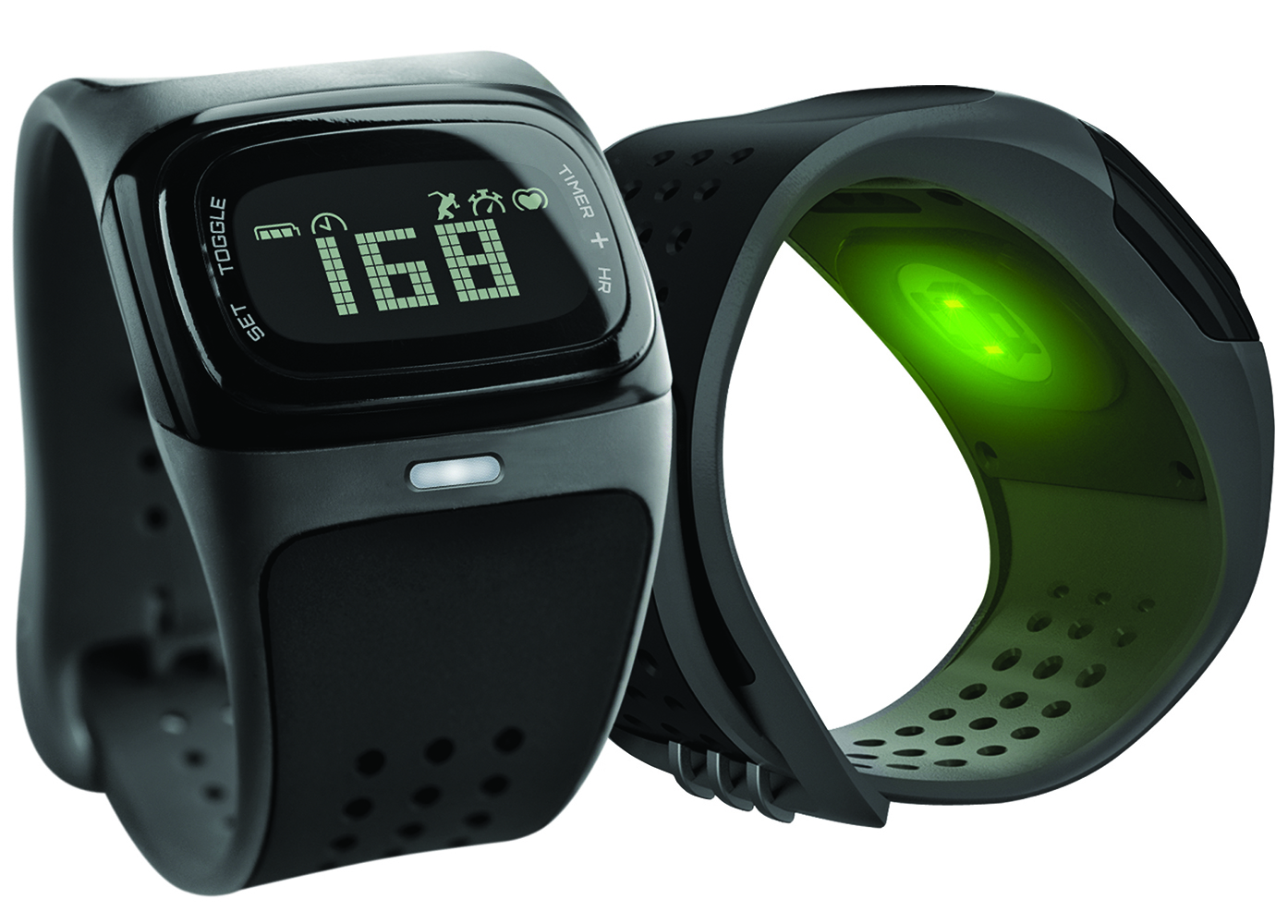
mio alpha

So, those are my picks, what are your 5 buy-it-now gadgets ?

 

Timeline of (my) Olympus cameras

Everyone knows me as an Olympus fan, not because I shoot lots of beautiful photos with Olympus cameras but the fact that I bought many Olympus cameras (Digital SLR and Mirrorless) since they launched the revolutionary E-1 camera in year 2003.

Ten years ago, there was really no original digital SLR (DSLR) camera design in the industry as most of them were just a rehash of the film SLR cameras. On the other hand, Olympus’ E-1 was really a ground breaking DSLR as Olympus designed the camera from ground up with many many new and digital photography specific features. So in the last 10 years, I bought eight (!) DSLR and Mirrorless cameras from Olympus and they are – E-1, E-300, E-510, E-P1, E-5, E-P3, E-M5 and the latest E-M1.

I reckon the best way to illustrate this crazy history is through the use of “timeline”. Unlike typical static WordPress timeline plug-ins, I use the interactive timeline script from timeline.knightlab.com. It lets you move along the timeline and click the image thumbnail to launch the blog post I wrote about the camera. Neat …

http://cdn.knightlab.com/libs/timeline/latest/embed/index.html?source=0AlHjesNCmKHpdDZWVnVuVTdOUXdzMkVJN1E1N25WREE&font=Bevan-PotanoSans&maptype=toner&lang=en&height=450

iPad Keyboard Case – The Final Episode

Yes, it’s going to be the final episode of the “iPad Keyboard Case” as I believe I have bought way too many iPad keyboards. In addition, I believe the new iPad 5 will be thinner than iPad 4 and so it is pointless to buy any new keyboards that may or may not fit the future iPads.

So, the latest keyboard I got after months of waiting is the Belkin Ultimate Keyboard Case for iPad. Is it good ? A resounding yes. Is it much better than many others’ favorite – Logitech Ultrathin iPad Keyboard Cover ? Well well …

First of all, the new Belkin keyboard is about US$ 25 more expensive than the Logitech one (as of end August 2013). And it is heavier, thicker, with softer keys and not as sturdy as the competitor (because of the multi-angle design, see below). However, it is really good in a few other areas:

  1. It protects the back of your iPad;
  2. It is heavier than the Logitech, but still lighter than others like ZaggFolio;
  3. It supports multiple-angle viewing (watch the video below);
  4. It can fold flat to become a tablet again (Logitech and others cannot do that), and it is particularly useful when reading ebooks in public transport, without looking like an idiot;
  5. The cover is special designed to enhance the sound flow towards you, it makes the audio sounds a little bit better;
  6. It’s more stylish (I bought the white color version, to fit my black iPad).

All in all, I am happy with the new member of my iPad keyboard family, and will use it for a while … before the next keyboard comes out. And here is a video to see how the keyboard case works with multiple angle set up.

Unlearn, relearn and the AWS Summit

The American futurist Alvin Toffler once said – “The illiterates of the 21st century will not be those who cannot read and write but those who cannot learn, unlearn, and relearn”. I think it is particularly true to those of us working in the Information Technology industry, as every two three years we need to unlearn some buzzwords, and relearn some buzzwords.

However, Cloud Computing are not buzzwords. Therefore, it is important for us to unlearn the previous know-how and relearn the new new things – the new way to design, implement, test, operate and monitor Cloud based IT systems. And one of the best ways to go thru this unlearn and relearn this cycle is to attend the Amazon’s AWS Summit.

One of the key learnings of in the Summit is you can auto-scale the IT systems. In the past few years, no matter who you talked to – salesperson, developers, architects etc., they would all tell you how great it was that you could easily scale up your Cloud based IT system when the system was under heavy loadings (for example, in peak hours of sales period, or festive seasons). Seems to me all they need is to scale up, all of them are very optimistic about their businesses !!

However, the true beauty of the Cloud system is in fact the ability of scaling down, not up, the Cloud based IT system. In other words, we shall design our system that based on certain business and technical criteria, the system can scale up to cater for the extra loading, and scale down to save cost.

In other words, the Cloud system is no longer a fixed architecture, but it will grow or shrink the computing power in line with the businesses. And it will cost more when the business is good, and less when the business is slow. Finally IT becomes part of the business.

Another key learning is the product life cycle that encourages innovation and idea trial. Unlike previous IT set up, now you can implement a basic computing architecture in the cloud in minutes. And you can close down that same architecture in seconds. That flexibility helps us to test drive any idea with ease, and with low cost barrier.

Amazon proposes a life cycle of :

Idea -> MVP -> Scale -> Profitability

(where MVP stands for Minimum Viable Product)

In other words, start with your brilliant but untested idea, build a MVP with minimal computing architecture. When it is a good idea to pursuit further, scale up quickly. Then reap the profit with as little computing power you need as possible.

So, if you missed the AWS Summit 2013 Singapore, and want to unlearn quicker and relearn more … Don’t miss the next AWS re:Invent 2013.

Singapore

Kindle Price Disparity

We all hate price disparity. No matter it’s a scoop of ice cream, a can of soda or a set of computer, you sure want a good price. So what if you can get a brand new, legitimate Kindle Paperwhite much cheaper than in US ? Yes, not same price as in US, but in fact US$ 65 cheaper.  It’s due to the fact that Japanese Yen dropped (and still dropping) like a stone in the past few months. And of course in Japan, Amazon needs to compete with good Sony Reader and others.

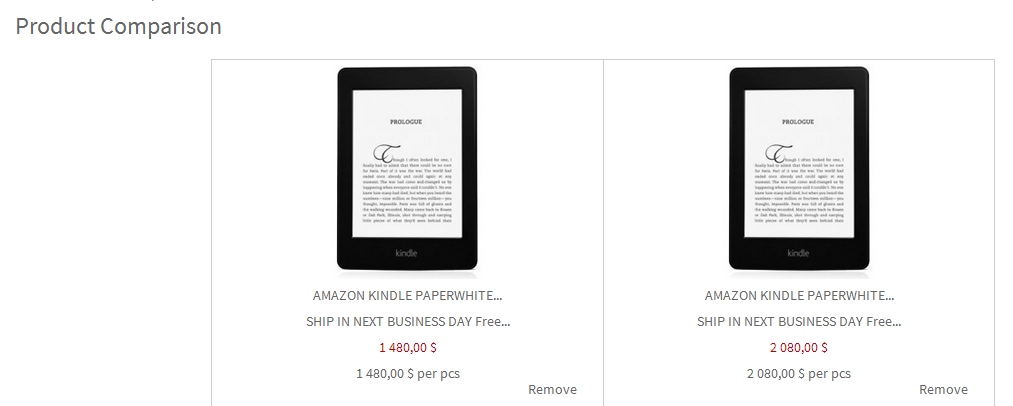
Here is a picture from a Hong Kong online retail store, selling Kindle Paperwhite 3G + Wifi, and Paperwhite Wifi. It’s about US$ 268 and US$ 191 respectively.

Hong Kong

OLYMPUS DIGITAL CAMERA

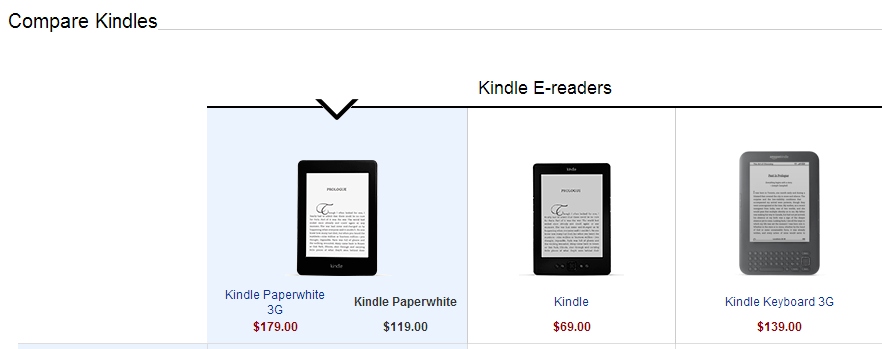
And here are the same two models from US Amazon store – US$ 179 and US$ 119, note that you need to add another US 20 (i.e. without special sponsors screens) and shipping cost.

USA

OLYMPUS DIGITAL CAMERA

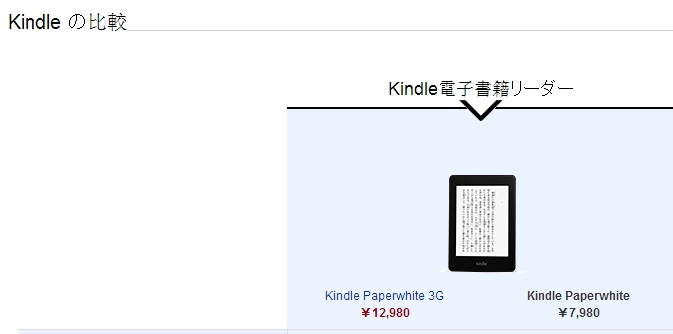
And lastly, here are the same two models in Japan Amazon store. Again you will need to add in the shipping cost, but as of today’s exchange ratio (May 1st), the prices are just US$ 133.5 and US$ 82 (before shipping) !! No Kidding !!

Japan

OLYMPUS DIGITAL CAMERA

So, if you have an Japan Amazon account or friends from Japan, it’s time to buy the beautiful Kindle Paperwhite. It’s simply irresistible.