Twitter Mania

So there is a rumor that Google is in negotiation to acquire Twitter. I think it is a great news, as the service will soon be more stable and the search will be more powerful. But to Google, why do they want to buy Twitter ? I don’t think Google really care what I am doing, thinking … as an individual, but I do think there are lots of companies want to know what the Internet users are doing and thinking … collectively. And they want to know these information in real time, they don’t want to wait. And that is why the Twitter platform and its search are so powerful. If I were Google, I would acquire Twitter, just for that.

Here are four examples I recently encountered, all because of my twits:

  1. I twitted that I was evaluating three websites A.com, B.com and C.com the other day … a few days later, both A.com and B.com followed me (I assume they want to know my opinion). And of course, I told myself that C.com was not doing good enough in collecting customer feedbacks.
  2. I modified a small program for WordPress and then I twitted about it … a few days later, the program developer followed me and asked what had I done – such that he could put in the change in next version. And he did !!
  3. Shortly I mentioned some technical keywords in my twits, a few recruitment firms followed me and asked me to follow them to get the latest job information.
  4. Last night, I twitted and asked for comments of a web site service … within an hour, I received a direct message from that web site and had a follower from that website’s competitor. Amazing, isn’t it ?

So, don’t use Twitter just to twit “What are you doing?”, but also use it as a tool to express your views, to collect other people’s views, and to spread your friends’ views (by re-twit) … all in real time.

Have you twit lately ?
Using Kindle outside US

Now, you have the Kindle by following the guide of buying Kindle 2 from outside US. There are couple of things you need to know on using Kindle in your homestead.

  1. Don’t charge your Kindle with your home power supply – unless at home you have the same voltage and US two-pronge plug. Instead, use the USB cable and charge it with your computer.
  2. Amazon use Whispernet to send the book to your Kindle, and it consumes lots of battery power of your Kindle as it needs to search / connect to Whispernet constantly. But since there is no Whispernet outside US, you shall switch off the Whispernet (from the Kindle menu) as soon as you get your hands on it.
  3. With your Kindle account, you need to set up a Kindle email address such as xxxx.xxxx@kindle.com. You can send files to that account and Amazon.com will convert the files for Kindle reading.
  4. On the other hand, Amazon will send the converted file to your Kindle directly via Whispernet. Since you don’t have Whispernet in your country. What you need to do is to send the files to a different address – xxxx.xxxx@free.kindle.com. Amazon will then convert the file and send you an email with a link to the converted file. You can then save the converted file and transfer to your Kindle.
  5. Kindle is beautiful, but make sure you buy a cover to protect it.
  6. Register to www.mobileread.com, it provides lots of support to mobile readers like us … outside Amazon.com.

Update : Since the screen saver picture also consumes power, therefore switch off your Kindle, instead of turning it to sleep mode before you go to bed. That will make your Kindle battery last for two, three weeks; instead of just a few days.

Update 2 : Kindle 3 is now available, great product !!

Update 3 : As you may aware, you can register your Kindle thru the “Manage your Kindle” in Amazon website, but not registering it using Whispernet … but here is a trick – create your own reginfo file and copy to your Kindle (for expert only … I warn you first).

Buy Kindle 2 from outside US

BREAKING (2009-10-07) : The Kindle 2 is now available for overseas market as well. So please read the following blog post if your country is not covered by the latest scheme, or you want to know more about other Kindle information.

Kindle 3 is also now available, go get it !!

So, you want the Kindle 2 but you are not living in US, what can you do ? (Since Amazon.com does not ship the Kindle outside the United States.) You basically have two options, one is ask a friend in the US to buy one and load it up with a lot of books and post it over. The other option is like what I did just 10 days ago (and now I have a Kindle 2 with me already).

  1. Basically, all you need is a Visa credit card and a mobile phone – if you’re staying in Hong Kong, Singapore, Mainland China and Taiwan.
  2. First, go to Onenow.com, get registered … turn on your mobile phone, as they will send your an SMS with the registration verification code. You will then get an USA address. Yes, it’s that simple.
  3. Go ahead to Amazon.com do shopping, the Onenow.com will resize the windows such that you will see the Onenow.com window (with your US address) and the main shopping window (i.e. Amazon.com).
  4. Buy the Kindle 2, and enter the Onenow.com US address as your delivery address. I also picked the standard delivery mode – i.e. 4 to 5 days to any US address and it costed me US$ 8.
  5. Upon finished the purchase, enter the purchase details to Onenow.com to indicate to them there is one shipment going to deliver to the address. They will have a Purchase verification code as an SMS as well.
  6. Later Amazon.com will probably send you information that the products has been shipped. And also Onenow.com will send you an email once they have received a package.
  7. By then you have a choice, indicate Onenow.com that the transaction has been completed or you can wait for other shipments (as many times eShop will split an order to several shipments). If you decided that the transaction has been completed you can click the “complete” button. And then click the “Ship” button to kick start the delivery process – you will need to enter your local delivery address and select delivery mode. I picked the speedier one as it cost only US$ 7 more (US$37).
  8. DHL is the delivery services provider of Onenow.com. Once the package Airway Bill prepared, they will send you the an electronic Proof of Delivery (ePOD) code via SMS and email – i.e. you need to confirm this code when the product arrives your door.

Update 1 : How do you buy Kindle as a gift without it attaches to your Amazon account? If you choose the gift option available in Amazon’s checkout process, the Kindle will not be attached to your Amazon account. The recipient will be able to register the Kindle to his/her Amazon account directly from the device or from the Manage Your Kindle page. If you forgot to choose the gift option, you need to “deregister” your Kindle 2 such that your friend can register it.

Update 2 : If you’re staying in Singapore, Australia, Malaysia or other Asian countries, you can also try VPost instead of Onenow.com. Hope it helps.

Update 3 : Amazon introduced some checks on the IP address to prevent people buying books from outside US from end September 2009. Please check this blog post on how to buy books and bypass the IP address check issue.

Update 4 : The Kindle 2 is now available for overseas market as well. So please read this blog post if your country is not covered by the latest scheme only

Some pictures of my Kindle 2:


Facebook photo album image size

Are the pictures in your Facebook album all look blurry, or out-of-focus ?

The reason is simple, your pictures are not optimized to be displayed in Facebook. Even though nowadays’ digital cameras can capture very high resolution pictures but you shall not upload your full-size pictures to Facebook album straightaway. That requires Facebook to resize the pictures to fit their page layout, and makes your pictures look blurry.

In fact, the optimal size for pictures in Facebook album is 604 pixels high (or wide). Therefore, before you upload the pictures to your newly created album in Facebook, try first resizing the picture to 604 pixels wide or high. Then, use the sharpening tool or unsharp mask within your image editing tool to sharpen the pictures. Lastly, upload those processed pictures to the album.

Update 1 : From January 20th 2010, Facebook has upgraded their photo album feature to support 720 pixels high (or wide). So if you have fast Internet connection, then why not resize the photos to 720 pixels and share those with your friends ?

Update 2 : From 2nd October 2010, Facebook upgraded their photo album to support upload of photos with 2,048 pixels. In addition, the site rolled out new uploader, friend-tagging feature and lightbox based viewer.

Update 3 : From end August, 2011 – now Facebook can display the photos up to 900 pixels (you can upload photos with bigger size, but it will downsize it to 900 pixels to display).

Update 4 : Just in case you are searching for this … the new Timeline Cover image / photo size is 850 x 315 pixels.

Update 5 : From March, 2012 – Facebook  upgraded the photo viewer application to support a full-screen view up to 2048 by 2048 pixels, the maximum upload size for users. However, the upgraded view will only work in recent versions of Firefox and Chrome. Users can open up the full-screen view by clicking “Fullscreen” in the options menu beneath the photo or clicking the arrow icon at the top right hand corner of the picture to expand the size.

Update 6 : So …. Google+ also changed the profile layout, and if you want to make a cover photo just for Google+, don’t forget to resize it to 940 by 180 pixels.

Update 7 : I just prepared some Facebook Timeline cover images for you all to download and use for free. Enjoy !!

Here you go, one sample album from my Kyoto trip with my beloved Olympus camera (link to E-P3, but the photos were taken with E-510). Enjoy !!


Installing Harmony 1000

Being a Harmony remote controller freak for years, it’s sad to learn that my Harmony 880 is dead after 4 years of services. And since the Harmony 1100 is not available in town yet, so I decided to buy the dated Harmony 1000 as a replacement. And … what a mistake ?!

All I wanted was to transfer all my 880 setup (stored in the Internet as XML files) to the model 1000 and it took me four hours to complete the job (countless installing, uninstalling, search for solutions, restarts etc. etc.). Even though the installation process is similar for all the Harmony remote controllers, the model 1000 hardware and firmware are just too crappy. Anyway, I hope this post can help Harmony 1000 owners to install it.

First, you have to ensure that you have:

  • the latest version of the Harmony software for your PC,
  • the firmware for the controller, and
  • the activity profile (i.e. how to control your TV, amplifier, players etc.).

Getting the up-to-date Harmony software is easy- just connect to the net and it will do the upgrade. Getting the activity profile right is also a piece of cake (for me I have it created it a few years back). However, for the firmware (after you downloaded from the site), it is a lot tricky as you need to make sure your PC can connect to the remote controller and install the latest firmware to it.

I spent hours just to make it work (i.e. the PC to recognize the controller), but found the solution eventually – i.e. turn the controller into “Save mode” whenever you need to reboot the controller. And the step to do it is to hold the on/off button while you are inserting the rechargeable battery into the controller.

So, before you do anything, try turn the controller to save mode first. Then when you install the firmware or when you update the activity profile to the controller, the controller may need to reboot itself – and don’t forget also turn to save mode manually during this reboot step.

Other things you may want to check are whether you need to relax or disable your firewall / anti-virus software during the installation; whether you are using an USB port or an USB hub. Also, don’t forget to check AVForums.com, RemoteCentral.com and Logitech.com for other support information that can help solving your problems.

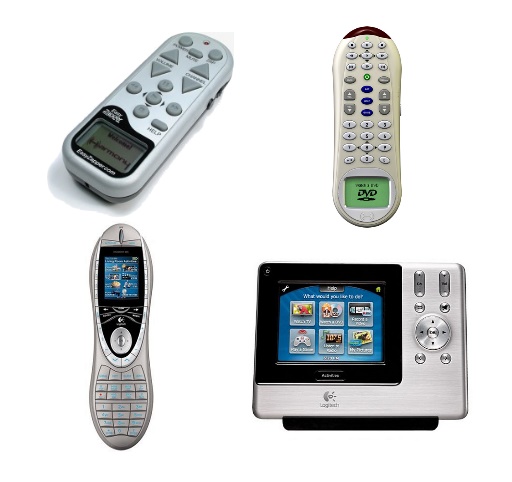
Lastly, some photos of the original Harmony Easy Zapper I bought 7 years ago, and then the rest Harmony remotes … 768, 880 and 1100. See how technology advances in the last 7 years !!

Harmony Remote Controllers