Manually upgrade Kindle 2 International to 2.5 (2.5.2)

Anticipated the firmware 2.5 upgrade for weeks but still it’s not available thru the Whispernet, so I told myself it’s time to find another way … by browsing the sites like mobileread.com and kindleboards.com, I found there is a way to do it manually – even though the firmware 2.5 (or 2.5.2) is not available from Amazon website.

In previous firmware upgrades, Amazon placed a link in the help page such that you could download the binary file and upgrade your Kindle manually if you didn’t want to wait for or could not access to the Whispernet. However, somehow Amazon does not do that for firmware 2.5. On the other hand, they placed the firwware binary file in the Amazon Web Services (AWS) and some smart people found it  (and it’s now named 2.5.2) … So, here are the steps and some screen shots of the version 2.5 new features.

(Note: these binary files work for Kindle 2 International version only and the files are available from the download links as of 2010-June-12)

  • First of all check your firmware version in your Kindle 2. In my case, it’s version 2.3.2.
  • So I downloaded the firmware 2.3.3 and upgraded my Kindle 2 International;

http://rapidshare.com/files/382788816/Update_kindle2_gw_2.3.3.bin

  • Then I downloaded the firmware 2.3.4 and upgraded again;

http://rapidshare.com/files/382794043/Update_kindle2_gw_2.3.4.bin

  • Lastly, downloaded the firmware 2.5.2 file and upgraded … simple and it worked !!

http://www.mediafire.com/?nqy2qmnmyjm

(To upgrade, transfer the binary file to the root directory of your Kindle, then go to Home / Setting / Update Your Kindle, then click yes)

Update 1 : (2010-06-16) The download is now available from Amazon website for your Kindle US and International version !!


Manage social network in Kindle

Kindle Software Update Version 2.5

The 2.5 software update for Kindle, Kindle 3 and Kindle DX is coming soon. Amazon is rolling out the new software update to first a limited group of Kindle users and plan a broad release in late May 2010. I shall update you all the goodies of this update once I got my Kindle upgraded.

Here’s a list of the coming enhancements:

  1. Collections: Organize your books and documents into one or more collections.
  2. PDF Pan and Zoom: Zoom into PDFs and pan around to easily view small print and detailed tables or graphics.
  3. Password Protection: Password protect your Kindle when you’re not using it.
  4. More Fonts & Improved Clarity: Enjoy two new larger font sizes and sharper fonts for an even more comfortable reading experience.
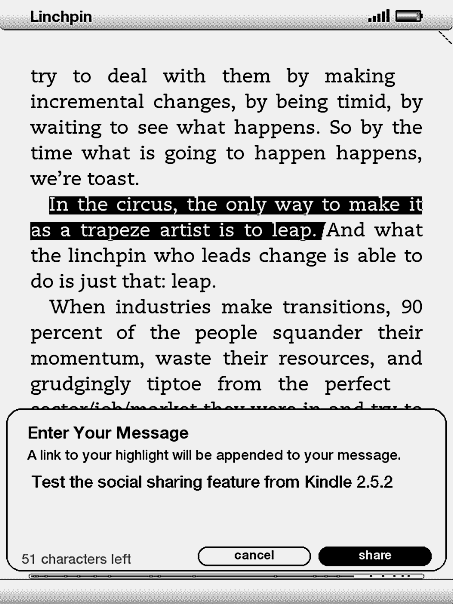
  5. Facebook & Twitter Posts: Share book passages with friends on Facebook and Twitter directly from your Kindle.
  6. Popular Highlights: See what the Kindle community thinks are the most interesting passages in the books you’re reading.

I can imagine I will use the second enhancement a lot …

Update 1: (2010-06-12) You can now upgrade the Kindle firmware to 2.5.2 manually, don’t miss it.

Kindle Apps for Tablet Computer (including iPad)

Ah, the Amazon development team is really efficient, just after a week from the release of Kindle for Mac they have another new product ready to roll out. Somehow the news is broken not from their official press release, but from a report in New York Times. This is the Kindle Apps for Tablet Computer, and it works on table computers including the iPad as well (obviously, they want people to know about this application, before the official launch date of iPad in early April).

Kindle Apps for Tablet Computers

Unlike other Kindle applications (iPhone, PC, BlackBerry, Mac), there are some new fancy features like:

  • Tailored to the size, look, and feel of your tablet computer
  • Adjust screen brightness from within the app to make reading easier
  • Page turn animation replicates the look of turning a page in a book. Or choose Basic Reading Mode for a simpler and unadorned reading experience

In the case of iPad version (assuming Apple will approve it …), the New York Times reports that:

“… large images of book covers are set against a backdrop of a silhouetted figure reading under a tree. The sun’s position in that image varies with the time of day.”

I know you want it, don’t you ? Check out the pictures and have a feel of this new application.

Kindle for Mac, now available

Yap, just one month after the beta version of Kindle for BlackBerry, today Amazon rolls out the Kindle for Mac. The features are similar to other free downloads like Kindle for PC and Kindle for iPhone. However, according to the press release

Several features will be added to the Kindle for Mac app in the near future, including full text search and the ability to create and edit notes and highlights. Kindle for Mac is available to customers around the world as a free download.

So I guess, we need to keep an eye on the future upgrade as well. You can download the free application from www.amazon.com/kindleformac. Will install it tonight to try it out …

Kindle for Mac

Kindle for BlackBerry (beta) is now available

After the Kindle devices, the applications Kindle for iPhone and Kindle for PC … now we have the Kindle for BlackBerry. The Kindle family is getting bigger and bigger. I can imagine soon we will have Kindle for Android, Kindle for OSX, Windows Phone Series 7 etc. etc. However, something new to me from their press release

  • Search and browse more than 420,000 books, including 102 of 112 New York Times Bestsellers, directly from their BlackBerry
  • Read books in full color, including children’s books, cookbooks, travel books, textbooks and graphic novels

Wow, 420,000 books !! And books in full color !! May be because I didn’t downloaded any cookbooks or travel books before, so I don’t really know whether my Kindle for iPhone and Kindle for PC have this function or not. Anyway, good news for all BlackBerry users.

Don’t forget to check out other Kindle posts !!