From Kindle to C25K

I am not an athletic person, especially after the heart surgery 3 years ago. So the most I can do are some casual weight lifting, power walks or slow jogging. I go to gym once a week (I know, it’s not enough), and now I can jog nonstop for about 2K and I always wanted to improve this. I thought, maybe one day I could join the yearly 10K run in town, with many of my friends.

So, I started to look for some good training plans, even not in a very active mode, to see how I can achieve this. And finally I found one very good training plan last weekend, all because of the Kindle and the social network … so, here is the story … Couple of days ago I blogged about the way to upgrade the Kindle 2 International to firmware version 2.5.2.:

  • I first upgraded my Kindle (get your Kindle 3 here), and then I blogged about it;
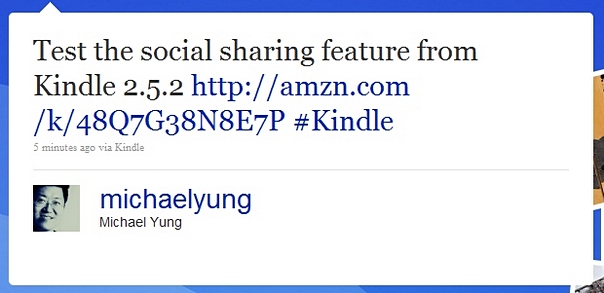
  • A tweet about this story was then sent thru Tweetdeck, with a shortened URL via bit.ly;
  • I monitored the tweet thru the search function in Tweetdeck and also the information provided by bit.ly, and found some retweets;
  • I then surfed the re-tweeters’ profile, found their blogs and tried to see anything I could learn from these new friends;
  • One of the tweeters from Hangzhou, China posted in his blog on how he enjoyed the training programme of C25K.com;
  • My next stop of course was the site C25K.com, studied the training programme in detail. And in the next hour, I found the podcasts of the programme from one of the fans, and downloaded to my iPhone.
  • Yesterday morning, I completed the first lesson of the week 1 C25K training program and really really enjoyed it !!

Can you see how the two unrelated things linked together by the social network ?! Amazing … and you know what, don’t stop by just posting things in your blog, Twitter or Facebook. But try to follow the “life” of your blog post, your tweets or your status updates to see where it will lead to, many times it will surprise you !!

c25k

Manually upgrade Kindle 2 International to 2.5 (2.5.2)

Anticipated the firmware 2.5 upgrade for weeks but still it’s not available thru the Whispernet, so I told myself it’s time to find another way … by browsing the sites like mobileread.com and kindleboards.com, I found there is a way to do it manually – even though the firmware 2.5 (or 2.5.2) is not available from Amazon website.

In previous firmware upgrades, Amazon placed a link in the help page such that you could download the binary file and upgrade your Kindle manually if you didn’t want to wait for or could not access to the Whispernet. However, somehow Amazon does not do that for firmware 2.5. On the other hand, they placed the firwware binary file in the Amazon Web Services (AWS) and some smart people found itย  (and it’s now named 2.5.2) … So, here are the steps and some screen shots of the version 2.5 new features.

(Note: these binary files work for Kindle 2 International version only and the files are available from the download links as of 2010-June-12)

  • First of all check your firmware version in your Kindle 2. In my case, it’s version 2.3.2.
  • So I downloaded the firmware 2.3.3 and upgraded my Kindle 2 International;

http://rapidshare.com/files/382788816/Update_kindle2_gw_2.3.3.bin

  • Then I downloaded the firmware 2.3.4 and upgraded again;

http://rapidshare.com/files/382794043/Update_kindle2_gw_2.3.4.bin

  • Lastly, downloaded the firmware 2.5.2 file and upgraded … simple and it worked !!

http://www.mediafire.com/?nqy2qmnmyjm

(To upgrade, transfer the binary file to the root directory of your Kindle, then go to Home / Setting / Update Your Kindle, then click yes)

Update 1 : (2010-06-16) The download is now available from Amazon website for your Kindle US and International version !!

Manage social network in Kindle

6 signs that you are addicted to Foursquare

Joined the Foursquare network for 7 months now but I have to admit I did not quite get it before. However, same as in any other social network, you really need to engage into it to see whether you can fit in. So this week I decided to use the Foursquare service as much as possible. Turned out I am addicted to it as you can see from the following six signs:

  1. You visit new places for lunch every day. Not for variety, but to earn more points (you get 5 points for every new place you check in).
  2. You revisit all the shops around your place to see any shops you can add to Foursquare database and of course, to get more check-ins (you get another 5 points for adding new place to Foursquare database).
  3. You will get mad by the inaccurate addresses and rush home / office early to login to Foursquare website to fix it (once you get enough points or add enough new places, you will become a “superuser” and empowered to edit places).
  4. On the way to office or back home, you alight the bus or subway one stop after or before – such that you can find some new places around your place, then walk back to your destination.
  5. While checking-in, you will look around when you find someone just checked-in the same place … even though he/she is not your friend.
  6. You left your smartphone at home and feel sorry about that. Not because you cannot make phone calls but cannot check-in easily.

Other tips:

  • If you want to become a place’s mayor, you need to upload your profile photo.
  • “To-Dos” are more like “notes to yourself” (e.g. “Remember to ask for free dessert.”)

So, after a week’s heavy use, I am now the top 5 users in town (I think that’s the best I can do). Feel good !! And I guess it’s one of reasons that keep me going – “Life as a game”.

Kindle Software Update Version 2.5

The 2.5 software update for Kindle, Kindle 3 and Kindle DX is coming soon. Amazon is rolling out the new software update to first a limited group of Kindle users and plan a broad release in late May 2010. I shall update you all the goodies of this update once I got my Kindle upgraded.

Here’s a list of the coming enhancements:

  1. Collections: Organize your books and documents into one or more collections.
  2. PDF Pan and Zoom: Zoom into PDFs and pan around to easily view small print and detailed tables or graphics.
  3. Password Protection: Password protect your Kindle when you’re not using it.
  4. More Fonts & Improved Clarity: Enjoy two new larger font sizes and sharper fonts for an even more comfortable reading experience.
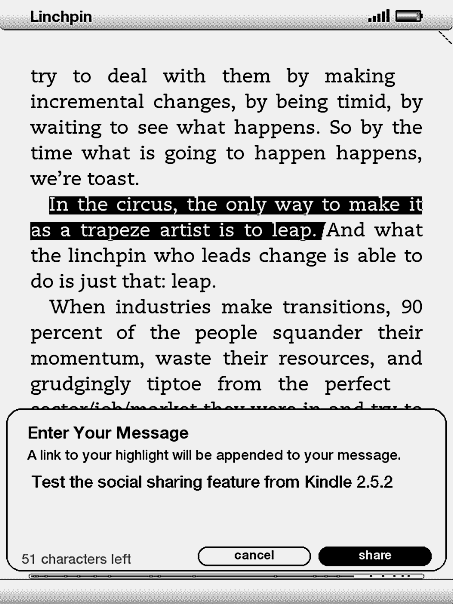
  5. Facebook & Twitter Posts: Share book passages with friends on Facebook and Twitter directly from your Kindle.
  6. Popular Highlights: See what the Kindle community thinks are the most interesting passages in the books you’re reading.

I can imagine I will use the second enhancement a lot …

Update 1: (2010-06-12) You can now upgrade the Kindle firmware to 2.5.2 manually, don’t miss it.