Kindle for the web

I think for those who care about eBooks, especially for those using Kindle to read ebooks, you probably know that you can read the ebook from Amazon in many platforms such as PC, Mac, iPhone, iPad, Android and Blackberry. However, you will probably wonder how you can read / preview an ebook within a browser, or a blog.

Wait no further, Amazon.com today introduced the beta version of “Kindle for the Web”, which enables people to read and share digital book samples in their browsers without the need to install or download anything.

Kindle for the web

I found it is the perfect way to recommend the books I like, instead of just a name or a book cover image … for example, the first chapter of the one I recently finished – Delivering Happiness: A Path to Profits, Passion, and Purpose.

http://kindleweb.s3.amazonaws.com/app/KindleReader-min.jsKindleReader.LoadSample({containerID: ‘kindleReaderDiv’, asin: ‘B003JTHXN6’, width: ‘680’, height: ‘600’, assoctag: ’80dayscom-20′});

The best ebook reader

“What’s the best ebook reader in the market ?”, “What’s the best ebook reader for me ?”, “Is iPad better than Kindle ?” … I asked myself these questions many many times in recent months, and I found the answer today.

As you can see from the photo below, I can read an ebook with Kindle, or applications of Kindle for iPhone, iPad, Mac and Windows. I found the Kindle for iPhone is great, just the screen is too small. The Kindle for iPad is also great, just it is too heavy, and you cannot read it under direct sunlight. iPad is perfect for reading eMagazine and casual reading, but to read a good and lengthy book ? No thanks.

And what about the Kindle applications for Mac, Windows, or even Blackberry and Android ? All these are good, but I know I will not take my Mac and my Windows laptop with me all the time; and I don’t have a Blackberry and Android phones (yet). So back to the questions … and there is only one answer:

“The best ebook reader is the one that’s with me.”

In other word the best ebook reader, to me, is the Kindle – as it is always travel with me. May be I will get a new one to replace the Kindle 2 (say, Kindle 4 when they support touch screen or Unicode), but for now, really it is the best. However, if iPad is the one device that always with you … good, it is the best eReader for you – just don’t let other people sell you the Kindle story.

By the way, how did I find the answer today ? I looked at the Shanghai photos I made recently, with my trusty Olympus E-P1 camera and then I reckon …

“The best camera is the one that’s with you.”.

Various eReaders

What to share and what your friends all care about ?

WordPress, Blogger, Facebook, Linkedin, Digg, Reddit, Twitter, Plurk, Foursquare, Gowalla … there are so many “networking” sites in Internet that you can access everyday from your laptop, cafe PCs and your mobile devices. Many times I ask myself why I want to share with my friends or a total stranger of what I am thinking, where I am and how to resolve some tricky problems.

I think the answer is simple, because many of us want to be a part of larger group, a good cause, or simply of something you care.

Not a frequent blogger, twitter myself but every time I want to post something on these social networks, I can’t help but to ask myself what the purpose of that blog post, tweet, news, or location is ? The information may be about Kindle, iPhone, photography, Information technology, web usability, food but the bottom line is – will my “friends” or “followers” benefit from it ? If not, then why post ?

Couple of days ago when I was reading the book Delivering Happiness : A Path to Profits, Passion, and Purpose by Tony Hsieh, a picture popped up in my mind.

That was, all these “information” I wanted to post in these networks actually intersect with each others and each of the intersections may serve a different group of my audiences. Then I drew the following picture / graph … about how I want to serve you, as my friend; with my expertise, news, views and where-abouts.

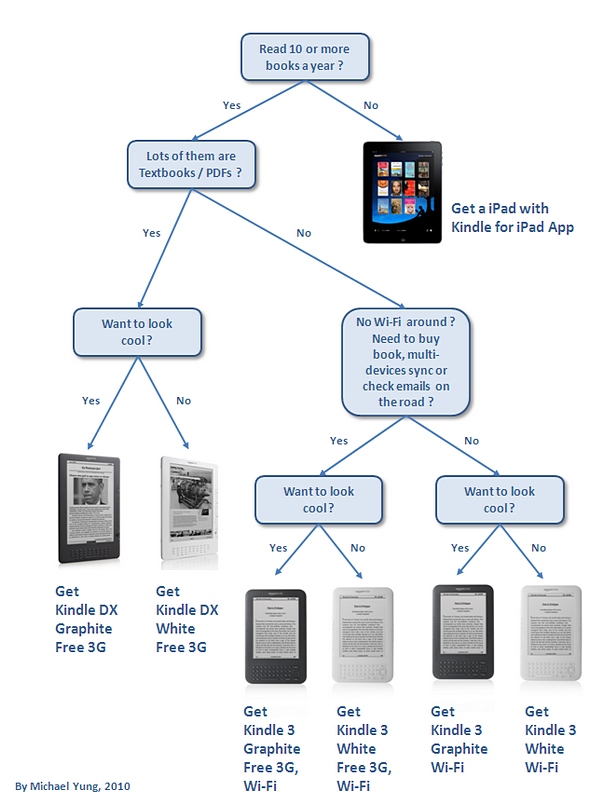
Which Kindle to buy ?

There are 6 models of Kindle you can buy now from Amazon.com, the Kindle DX (with white or graphite colors, in different prices), the Kindle with Free 3G + Wi-Fi, and the Kindle with Wi-Fi only (both with white or graphite colors). Each of these Kindles is good device to read, but which Kindle shall you buy ?

To answer this question, I draw up the following flowchart and hope you will find it useful.

Don’t miss all the other Kindle blog posts !!

Why Kindle ?

I have my Kindle 2 for over a year now and since the launch of iPad in April, people keep asking me a boring question, that is – “Why Kindle ?”. And of course, the question always follow by another equally boring one, that is – “Why not iPad ?”. In most cases, I answer the two questions with another question – “How many books have you read in the past 12 months ?”.

“Errh … may be one or two.” is the typical answer. And I think they answer their own questions.

Late last month, Amazon launched the Kindle 3 and Jeff Bezos was interviewed by the acclaimed interviewer and broadcast journalist, Charlie Rose. And now I know, what’s the best answer to these questions.

Straight from Jeff Bezos:

“I would say something though like we’re trying to get out of the way.  We’re not trying to create an experience.  We want the author to create the experience.  You know, if you’re going to read Nabokov or Hemmingway or we want us creating the experience for.  That’s not our job.  Our job is to provide the convenience.  That you can get books in 60 seconds, that you can carry your whole library with you so that you don’t get hand strain, so the device doesn’t get hot in your hands, so that it doesn’t cause eye strain, so that the battery life lasts a month, so you never get battery anxiety

Now people say why don’t you add a touch screen?  Well, the reason we don’t want a touch screen is if we’re going down that decision path, we say, okay, a touch screen and the current technology for touch screens — it’s called capacitive touch — it’s a layer that goes on top of that display.
 It adds glare.  The first thing that you do when you add a touch display is that you add a little extra layer of glass or plastic and a little bit of glare.  So it’s very easy from an engineering point of view to add a touch screen but it’s not the right thing if you’re making no compromises and that’s our point of view on this.  We want a device that’s for uncompromised reading and guess what?  Our approach is working.”

Yes, if you read lots of books a year, in long-form reading style, then you need Kindle. Period.