Kindle 2 vs. Kindle DX

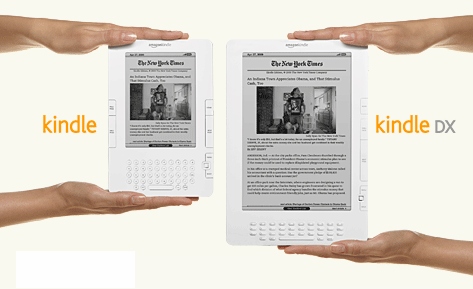
As a Kindle 2 owner outside US for just two months, what’s the impact of the new shiny Kindle DX ? Now, here are my takes:

The Good

  1. The new Kindle DX reads PDF files natively – that’s the only reason I will consider to buy the Kindle DX – if I buy one.
  2. The screen auto-rotates the document you’re reading as you turn the device.
  3. The screen is bigger, a lot bigger.
  4. Now the device can store up to 3,500 books and documents.
  5. The keyboard is now better, I think … the Kindle 2 keyboard is really hard to type.

The Bad

  1. The new Kindle DX reads PDF files natively – but of course the PDF file is still a 16 gray document. When was your last time read a black & white PDF document ?
  2. The screen auto-rotates the document you’re reading as you turn the device. Seriously, I don’t think it is good for reading books, especially the menu / next page buttons are now all positioned on top. I think it is good for viewing web page though, since you already get used to view web pages in landscape mode. However, there is no use to me as we cannot use Kindle to surf, outside US.
  3. The bigger screen is good, especially you read lots of full size PDF files, magazines and newspaper. But I don’t need big device because I use my Kindle mainly in subway, buses, planes and cafes. In addition, we cannot subscribe to magazines and newspaper outside US (which needs the Whispernet to download).
  4. Now the device can store up to 3,500 books and documents – but why ? Imagine you need to use the Search function to find your books, from now on.
  5. Somehow, there is no previous / next buttons in the left hand side of the device. If you’re a lefties, hard luck.

The Ugly

  1. I don’t see why I want to pay US$500 for a eBook reader. Assuming there will be another new Kindle in two years, and I can save 10 dollars from every Kindle book … it means I shall read 50 books in two years to pay for the Kindle DX. Don’t think I can do it, really.

What’s your view ?

kindle-kindle-dx

Google Profiles – your own online reputation management

I think many of you understand the importance of branding yourself in Internet. You will probably detail your professional profile in Linkedin and Visualcv; share your hobbies / interests in Facebook and Myspace; express your views / opinions in your own blog; and voice your ideas in your Twitter page.

However, one thing is very difficult to control … that is, the search result of your own name in Google. First, there may be many people sharing your same name. Secondly, you may also find some bad / nasty stuff in the search results – some belong to another you with same name, some belong to you but are just crude exaggerations (from your point of view, of course).

And now, there is a solution of that Google search problem – also from Google. Last week, Google gives you more power to control how you appear on Google products – the Google Profiles. In their words:

A Google profile is simply how you present yourself on Google products to other Google users. It allows you to control how you appear on Google and tell others a bit more about who you are. With a Google profile, you can easily share your web content on one central location.

In your profile, you can include information like your name, where you are working, where you studied and obviously, your “About Me”.

If this new service can really deliver what it promises, the SERP shall show your tailored profile (the face you want to show to other people). The downside of that of course is you have one more online real estate to manage.

So have I created my Google Profiles ? You bet.

Google Profile

Registering Kindle 2 from outside US

The short answer to that task is “No, you cannot do that”. And following is the long answer and how I did it a couple of days ago in a trip to US. (See also the Update 1 below)

You cannot register your Kindle 2 (click Settings in Home / Menu) outside US, as it works only wirelessly with Sprint network in US. And even you can hack your Kindle to connect to Internet (without the Sprint network), the built-in GPS in Kindle 2 will reject the registration. In other words, you need to fly to US or ask your friend to take your lovely Kindle 2 to US to do it for you.

But still, without registering your Kindle 2, you still can buy eBooks and read those without any problems.

Anyway, I did register mine in a recent trip to US, and here are the details. I arrived San Francisco airport and I took out my Kindle 2, switched it on, turned on the Whispernet and tried to register.

Surprisingly, the device registered itself (I thought I needed to enter the Amazon membership information). And my Kindle also downloaded the previous sample reading, downloaded Jeff Bezos welcome letter and even whispersync my other book I was reading with my Kindle for iPhone. Freaking brilliant.

Then I started the Kindle shop from within the Kindle 2, searched the book I want (Quiet Strength), clicked Go and bought a book. Within a minute, my Kindle 2 homepage shows the new book. It’s that easy. The only thing I thought it could improve was it should have indicated that the book has been downloaded – as just from the name in the homepage, I could not tell (from user experience point of view) whether the Kindle was downloading a book, or already finished the download. Anyway, I browsed the new book a bit and confirmed all chapters were there.

So, my Kindle 2 is kinda completed all the basics, the next frontier is to hack the Kindle 2. Stay tuned.

Update 1 : If you really want to register your email address, Kindle name etc. to your Kindle – without Whispernet, here is a trick … create a reginfo file and copy it to your Kindle (for expert only though …. I warn you here).

Kindle for iPhone from outside US

Yes, after getting the Kindle 2 and buying Kindle books from outside US, the logical next step is of course getting the Kindle for iPhone. As in my other blog posts, here are the steps:

  1. To prepare for it, you need a new email address (other than the one you registered to iTunes) from Gmail, Yahoo etc. In other words, don’t use an email address with a country suffix.
  2. Connect your iPhone, kick start the iTunes and sign out from the default email address (Apple ID) by clicking the email address button in the upper right corner of the iTunes.
  3. Go to iTunes Store homepage, scroll down to the bottom and then change the country to United States.
  4. Search for Kindle for iPhone in that US iTunes store, and click the “Get App” button.
  5. When you see the sign in screen, do not sign in. Instead click “Create New Account”.
  6. Register as usual but in the Payment Method Page, click “none” as the method … that means you can download free application only in the future, but it avoids the issue of getting an US based credit card. (I suppose the Paypal will work as well, but I have not tested it).
  7. Then enter the US Address and phone number that generated before.
  8. That’s it !! You created a iTunes new account with your email as the new Apple ID !!
  9. Make sure you click the link in the iTunes Store Account Verification email to activate your account.
  10. Now you should be able to download the Kindle for iPhone application and synchronize to your iPhone.
  11. Run the application in your iPhone and enter your Amazon account information. And you shall see the Kindle eBook you bought before !!

Note : Since there is no Whispernet here, therefore the Whispernync may not work. In other words, you may not able to switch back and forth between your Kindle and your Kindle for iPhone, and each will keep track of where you’ve stopped reading. But you can download the books from your Amazon archive and read it in iPhone. Enjoy !!

Update 1 : In step 7, I reckon since you don’t need a real physical address to ship anything, so may be all you need is to get any US address and corresponding phone number … even the White House address shall work. Just a thought.

Here is the proof : The books I bought so far …

Kindle for iPhone

Twitter Mania

So there is a rumor that Google is in negotiation to acquire Twitter. I think it is a great news, as the service will soon be more stable and the search will be more powerful. But to Google, why do they want to buy Twitter ? I don’t think Google really care what I am doing, thinking … as an individual, but I do think there are lots of companies want to know what the Internet users are doing and thinking … collectively. And they want to know these information in real time, they don’t want to wait. And that is why the Twitter platform and its search are so powerful. If I were Google, I would acquire Twitter, just for that.

Here are four examples I recently encountered, all because of my twits:

  1. I twitted that I was evaluating three websites A.com, B.com and C.com the other day … a few days later, both A.com and B.com followed me (I assume they want to know my opinion). And of course, I told myself that C.com was not doing good enough in collecting customer feedbacks.
  2. I modified a small program for WordPress and then I twitted about it … a few days later, the program developer followed me and asked what had I done – such that he could put in the change in next version. And he did !!
  3. Shortly I mentioned some technical keywords in my twits, a few recruitment firms followed me and asked me to follow them to get the latest job information.
  4. Last night, I twitted and asked for comments of a web site service … within an hour, I received a direct message from that web site and had a follower from that website’s competitor. Amazing, isn’t it ?

So, don’t use Twitter just to twit “What are you doing?”, but also use it as a tool to express your views, to collect other people’s views, and to spread your friends’ views (by re-twit) … all in real time.

Have you twit lately ?