Which Kindle to buy ?

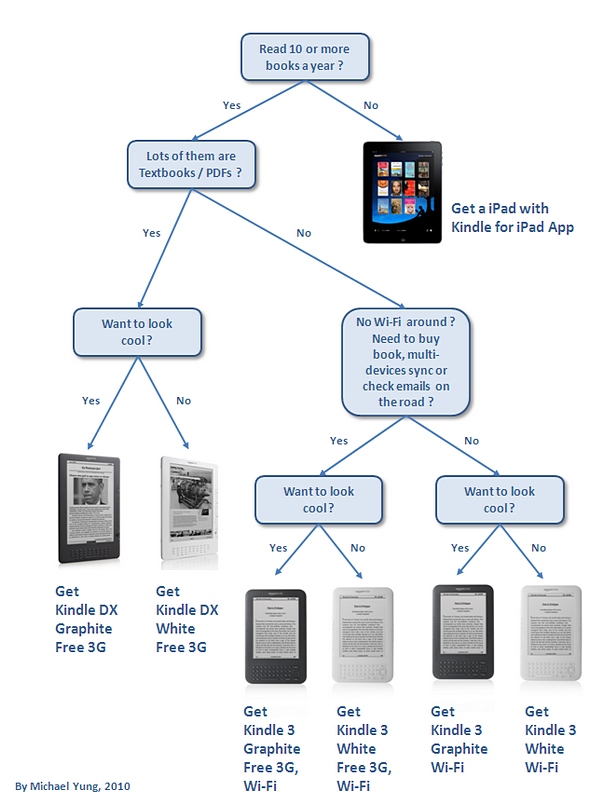
There are 6 models of Kindle you can buy now from Amazon.com, the Kindle DX (with white or graphite colors, in different prices), the Kindle with Free 3G + Wi-Fi, and the Kindle with Wi-Fi only (both with white or graphite colors). Each of these Kindles is good device to read, but which Kindle shall you buy ?

To answer this question, I draw up the following flowchart and hope you will find it useful.

Don’t miss all the other Kindle blog posts !!

Why Kindle ?

I have my Kindle 2 for over a year now and since the launch of iPad in April, people keep asking me a boring question, that is – “Why Kindle ?”. And of course, the question always follow by another equally boring one, that is – “Why not iPad ?”. In most cases, I answer the two questions with another question – “How many books have you read in the past 12 months ?”.

“Errh … may be one or two.” is the typical answer. And I think they answer their own questions.

Late last month, Amazon launched the Kindle 3 and Jeff Bezos was interviewed by the acclaimed interviewer and broadcast journalist, Charlie Rose. And now I know, what’s the best answer to these questions.

Straight from Jeff Bezos:

“I would say something though like we’re trying to get out of the way.  We’re not trying to create an experience.  We want the author to create the experience.  You know, if you’re going to read Nabokov or Hemmingway or we want us creating the experience for.  That’s not our job.  Our job is to provide the convenience.  That you can get books in 60 seconds, that you can carry your whole library with you so that you don’t get hand strain, so the device doesn’t get hot in your hands, so that it doesn’t cause eye strain, so that the battery life lasts a month, so you never get battery anxiety

Now people say why don’t you add a touch screen?  Well, the reason we don’t want a touch screen is if we’re going down that decision path, we say, okay, a touch screen and the current technology for touch screens — it’s called capacitive touch — it’s a layer that goes on top of that display.
 It adds glare.  The first thing that you do when you add a touch display is that you add a little extra layer of glass or plastic and a little bit of glare.  So it’s very easy from an engineering point of view to add a touch screen but it’s not the right thing if you’re making no compromises and that’s our point of view on this.  We want a device that’s for uncompromised reading and guess what?  Our approach is working.”

Yes, if you read lots of books a year, in long-form reading style, then you need Kindle. Period.
10 steps to migrate your iPhone 3G / 3GS to iPhone 4

So you have decided to go for the iPhone 4 after all the reviews of exciting features (if you are an Apple fanboy) and news / blogs about the antennagate (and you really don’t care). Here are the steps you need to do to migrate your trusty iPhone 3G / 3GS to the iPhone 4.

  1. Make sure your old iPhone has performed a complete backup via the iTunes
  2. If you’re using Kindle for iPhone, deregister the device (from within the application).
  3. Make sure you have Internet connection, such that iTunes can access iTunes store. Connect your new iPhone 4 to your PC running iTunes and register your new iPhone 4, with your Apple ID.
  4. Since your iPhone 4 come with iOS 4.0 only, download and install the iOS 4.0.1, thru the iTunes (so pretty much automatically)
  5. Restore the content / applications / setting from the iTunes backup image to your new phone
  6. Check all the settings to see things are in good order. Check all the email accounts / applications, by running each of the applications once and enter application-dependent password again (if neccessary).
  7. If your old phone has upgraded to iOS 4.x and you have created folders. Bad news, you have to organize the folders and applications in your new iPhone again. Somehow the restoration will migrate the folders but not moving the applications to the right folder as set up in your old phone.
  8. Install the iPhone case program (program ended) application to your iPhone. Run the application with appropriate Apple ID password, and pick the case you like. For review and photos of the cases, here is a good resource.
  9. Erase the iPhone 3G content via Settings / General / Reset / “Erase all content and settings”, confirm two times and it’s done (it will take long time to finish the erase, however). Now you can pass the phone to your friends or family members.
  10. Very last step, install some good looking wallpapers like I did in the new iPhone 4:

All new Kindle – smaller, lighter, and faster

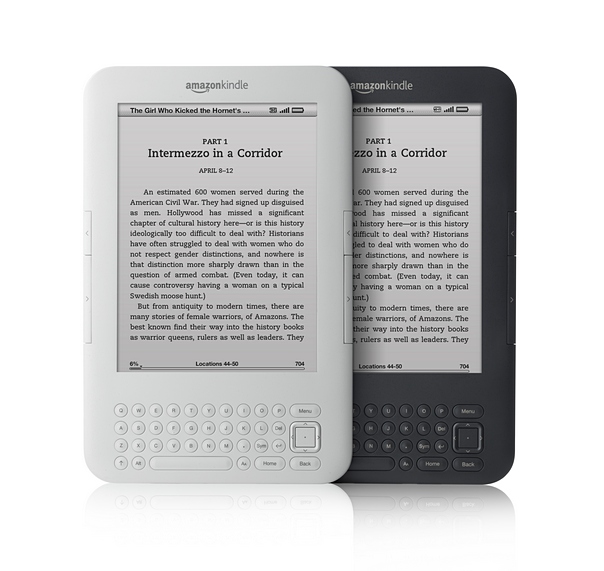
Oh, 16 months after my Kindle 2, the new generation of Kindle is announced today (Kindle 3). Available from 27th August (in over 140 countries), the new Kindle is 21 percent smaller, 17 percent lighter, more memory (4GB), better battery life (up to a month without wireless) and equiped with a better contrast, 20 percent faster refresh rate on its screen. Same as the DX, now it comes in two colors (graphite, and white). Unlike the Kindle 2, there will be two connection / pricing configurations: a $139 WiFi only version, and a $189 3G version (I guess it’s the same for International version). The screen however will remain the same 6-inch size.

From the look of this new device, the most notable change is the relocation of the direction pad to next to the keyboard. I bet the keyboard is still very difficult to use, however. Software-wise, the big thing to me is the enhanced PDF Reader – with dictionary lookup, notes, and highlights. Lastly, a new WebKit-Based browser, that I really want to try out.

So, how the new one compares to the Kindle 2, side by side ?

Kindle differencesSome more pictures of the new Kindle:

Kindle platform now includes Android and adds audio, video

Competition is good, I guess. The success of Apple iPad makes Amazon works harder and harder to roll out new and exciting stuff. One of the key advantages of Kindle “platform” is you can access your Kindle library anywhere and have your reading synchronized across Kindle devices and multiple smartphones. And this platform compose of Kindle 2, Kindle 3Kindle DX, BlackBerry, iPad, iPhone, iPod touch, Mac, PC, and now Android-powered phones.

As far as I can tell, the features in this Kindle for Andriod is more or less the same as other devices’ applications. However, the screen that shows your book library looks a little bit different.

Android kindle 1Android kindle 2

Another exciting news is the embedded video and audio clips in Kindle books on iPad, iPhone, and iPod touch. Not as crazy as the Alice for the iPad I bet, but still it is the right direction to introduce multimedia to ebooks. Since it is the new new stuff, I just checked and there are only 13 ebooks with audio / video in US store and only 7 available in Asia store.

Kindle audio-video