Review of three iPhone docks

Different horses for different courses … all along I want to use my iPhone in three different places for totally distinct usages:

  1. Connect to a notebook computer, sync my iPhone but also house an USB hub and memory card reader;
  2. Connect to nothing, but iPhone as a loud music player in my small office;
  3. Connect to a mini-HiFi, my iPhone as the music and Internet radio source.

In other words, all I need is a multi-purposes devices – an iPhone dock that can connect to an AV amplifier but also a speaker, USB hub and a memory card reader. Of course, there is no such device and therefore I bought three docks to achieve this.

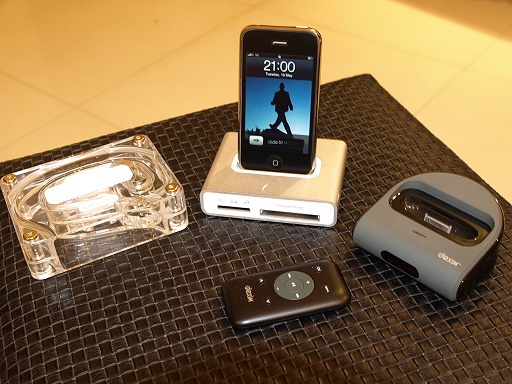
First is the Simplifi from Griffin Technology – It is a charge/sync dock, memory card reader, and USB hub. See the photos below for the look of it, it works perfectly and I am now using it with my notebook computer. It really is a space saver.

  • Pros : Hi-speed USB link, all-in-one device, not expensive, match with MacBook nicely
  • Cons : USB cable to connect to computer is not long enough

The second one is also from Griffin and it is a simple dock that also act like a mono-speaker – Griffin AirCurve Acoustic Amplifier for iPhone. The Aircurve, a cleverly-designed acoustic amplifier, is basically a coiled waveguide “horn’ that collects the sound from the built-in speaker of your iPhone and then amplifies it. Of course it is not a Bose speaker system, but it is good enough for my small office.

  • Pros : Stylish, not expensive
  • Cons : Not a small dock (check the pic), so-so quality loudspeaker (it is mono, after all), you also need to get your own iPhone cable to do the synchronization

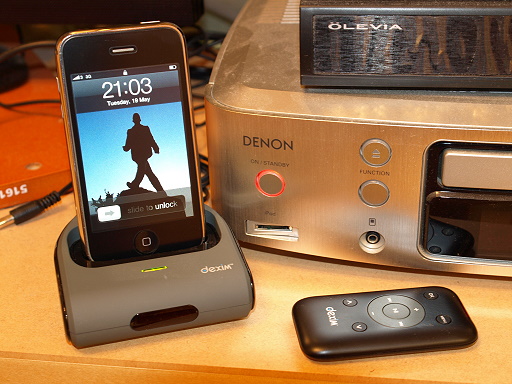
Lastly, the Dexim AV Dock is similar to the Apple iPhone AV dock. It connects to my mini-HiFi and in turn to my LCD TV. Now with this AV dock, I can watch videos, view photos on my TV. And also I can play my iTunes music, Internet radio show thru the mini-HiFi.

  • Pros : An cheaper alternative to the Apple dock / cable, easy to set up, stylish
  • Cons : You need to turn the volume way up high to appreciate the music

Life is good.
Kindle for iPhone from outside US

Yes, after getting the Kindle 2 and buying Kindle books from outside US, the logical next step is of course getting the Kindle for iPhone. As in my other blog posts, here are the steps:

  1. To prepare for it, you need a new email address (other than the one you registered to iTunes) from Gmail, Yahoo etc. In other words, don’t use an email address with a country suffix.
  2. Connect your iPhone, kick start the iTunes and sign out from the default email address (Apple ID) by clicking the email address button in the upper right corner of the iTunes.
  3. Go to iTunes Store homepage, scroll down to the bottom and then change the country to United States.
  4. Search for Kindle for iPhone in that US iTunes store, and click the “Get App” button.
  5. When you see the sign in screen, do not sign in. Instead click “Create New Account”.
  6. Register as usual but in the Payment Method Page, click “none” as the method … that means you can download free application only in the future, but it avoids the issue of getting an US based credit card. (I suppose the Paypal will work as well, but I have not tested it).
  7. Then enter the US Address and phone number that generated before.
  8. That’s it !! You created a iTunes new account with your email as the new Apple ID !!
  9. Make sure you click the link in the iTunes Store Account Verification email to activate your account.
  10. Now you should be able to download the Kindle for iPhone application and synchronize to your iPhone.
  11. Run the application in your iPhone and enter your Amazon account information. And you shall see the Kindle eBook you bought before !!

Note : Since there is no Whispernet here, therefore the Whispernync may not work. In other words, you may not able to switch back and forth between your Kindle and your Kindle for iPhone, and each will keep track of where you’ve stopped reading. But you can download the books from your Amazon archive and read it in iPhone. Enjoy !!

Update 1 : In step 7, I reckon since you don’t need a real physical address to ship anything, so may be all you need is to get any US address and corresponding phone number … even the White House address shall work. Just a thought.

Here is the proof : The books I bought so far …

Kindle for iPhone

GPS assisted travel

In my home town there is really no place for GPS as our city is so small and the transport system is so efficient that we can always go to one place from another easily. With the help of 3G iPhone and its AGPS, the trip to Boston was my first time to travel abroad with a GPS … and it was really a great device that helped a lot.

Same as a well designed webpage navigation system, it is important to know where you are, where have you been and where you can go. That’s exactly what the GPS could do for me in Boston and it was fast to track the location as well (thanks to the AGPS, instead of typical GPS).

The first pic shows how I could go to the Boston Apple store from the hotel I stayed, as suggested by the iPhone.

And this pic shows it all, the famous Google pin … I know I am in the right place.

WordPress for iPhone

With nothing to do in the conference, I browsed the iPhone application store with the phone (must be an expensive way) and found the new WordPress for iPhone was released …

The installation was easy and finished on the fly. The first problem … It created a dummy post in my blog with placeholders like !$titles$! in it. And I could not remove it thru the tool but had to go back to the online full version.

WTF … Did they test the software at all ?