Getting freebies with Twitter

You probably know with good use of Twitter, you can fix your hotel reservation issue and even get a free dessert / appetizer. What about getting some freebies by just tweeting? You can certainly do that by:

  1. Writing a tweet about how good a company is;
  2. Writing one to complaint a company instead;
  3. Telling the world that you’re fixing a software problem, specify the company’s name in your tweet;
  4. Letting people know that you’re evaluating a website’s products / services, don’t forget the company’s name.

You know what, the companies mention in your tweets will not send you free stuff, but their competitors will as they are constantly monitoring any tweets about their rivals. For example, two hours after I tweeted about evaluating an image website …

Free credits

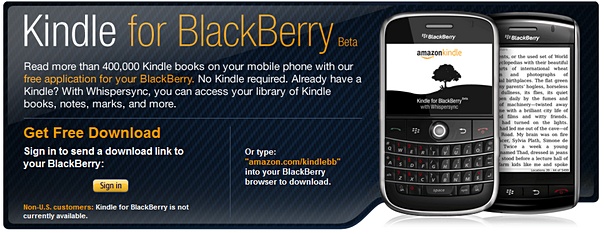
Kindle for BlackBerry (beta) is now available

After the Kindle devices, the applications Kindle for iPhone and Kindle for PC … now we have the Kindle for BlackBerry. The Kindle family is getting bigger and bigger. I can imagine soon we will have Kindle for Android, Kindle for OSX, Windows Phone Series 7 etc. etc. However, something new to me from their press release

  • Search and browse more than 420,000 books, including 102 of 112 New York Times Bestsellers, directly from their BlackBerry
  • Read books in full color, including children’s books, cookbooks, travel books, textbooks and graphic novels

Wow, 420,000 books !! And books in full color !! May be because I didn’t downloaded any cookbooks or travel books before, so I don’t really know whether my Kindle for iPhone and Kindle for PC have this function or not. Anyway, good news for all BlackBerry users.

Don’t forget to check out other Kindle posts !!

Customer service in 21st century, in Twitter style

So we all know Twitter can do many things – other than telling your followers what you’re eating, you can also use Twitter to express your views, to collect other people’s views, and to spread your friends’ views (by re-tweeting). And of course, we’ve heard many stories about using Twitter to find missing teens or getting better customer services.

I for one is a believer that Twitter can help improving customer services but then believing is one thing, can experience one is another. That was an incident last week related to a trip to Mumbai, India in February and I needed to get a room and airport transportation services from Hyatt Mumbai.

Looked like a simple task, I know. But somehow somewhere the reservation record was not right, I had email exchanged with the “e-concierge”, the “Catering Sales manager” (yes, strange I know) and “General Manager” (yes, right), but still could not sort the things out. So I decided … to air my frustration through Twitter.

And then within two hours, Hyatt customer services / Twitter team found my tweet and replied with another tweet.

I then direct-messaged the reservation confirmation number to them. In an hours or two, I was told the reservation was done exactly the same as my request, and then a follow-up email from Hyatt Germany service team (!!) wrapped up the case.

Wow, I love Hyatt’s service and obviously the capability of Twitter. The big question to me is how can one corporation compete without providing the same level of services in today’s world ?

What’s your Twitter customer service stories ?

iPad vs. iPhone + Kindle

I use iPhone and Kindle 2 heavily and I also have iPod, MacBook etc. Even though I am not really a super fanboy of Apple … still, I thought a tablet from Apple is something I was waiting for, until I see the iPad today.

It’s thin, it’s beeeeautiful, and the user interface is certainly sleeeek. But wait, where are the new new things ? In fact,

  • There is no phone – sure, I can make VOIP phone call … but why ?
  • No camera – so no snapshots, no video phone conference / calls, no augmented reality applications,
  • No multitasking – I cannot download videos while I am doing something else,
  • No HDMI output – I cannot use it as the Youtube video station for my TV,
  • No Flash support – I guess I have to wait for HTML 5 websites … but again, why ?

You know, I thought Apple would announce a super new way to browse magazines and newspaper with iPad that can save the publishing industry, but no, again probably need to wait for some super-duper iPad application to do that. So is the iBooks really better than Kindle for iPhone ? Who knows …

And seriously, how can you hold this device for hours to read a book (my Kindle 2 can easily do that, and the battery can last for two weeks) ? And how can you take this from your home to your office, or your frequent coffee shop without adding a cover / bag ?

So far, really, I can think of only one big big reason to get one … that is if I want to share my photos with my friends and family, on the road.

Video from Engadget.com.

http://www.viddler.com/simple_on_site/51b063e8

Running Gmail with your Kindle 2

Imagine the following scenario …

  • You’re a stranger in a foreign land / airport;
  • Your smartphone is out of juice or you don’t want to pay hefty data roaming fee;
  • You cannot find a (free) WiFi hotspot for your laptop;
  • And you need to answer some emails via Gmail.

Sounds familiar ? Now you can do that if you have a Kindle 2 (or Kindle 3), as long as you can live with some constraints. As many of you already know, there is a very simple browser come with the Kindle 2, and there is a mobile version of Gmail with minimal graphics. Therefore, it makes sense to use that simple browser to access the simple web application. The constraints and preparation works are:

  1. It works only for countries / cities that support by Amazon Kindle 2’s WhisperNet  (the flip side of this is you don’t need to pay expensive data roaming fee to check emails !!)
  2. The screen of Kindle 2 is relative small;
  3. The keyboard of Kindle is hard to type;
  4. There is no scroll up and down function (you need to use Next Page and Prev Page keys);
  5. You cannot read / write double byte / Unicode characters;
  6. You will not able to attach files.
  7. In the settings of the browser, turn on Advanced view mode and turn on Javascript

Still want to continue ? OK, let’s start, step-by-step :

  1. Turn on the wireless in your Kindle. Then go to “Home” / “Menu” / “Experimental”, and select “Basic Web”
  2. You will see the bookmark page, and “Menu” / “Enter URL”, and enter m.gmail.com
  3. You will see the basic login page and enter your Gmail account information.
  4. Somehow, Gmail will display the usual Gmail screen with all the mails which makes the screen very busy. I believe Gmail do this because they know that the request is not from a mobile device. Now, go to the URL bar on top, and enter m.gmail.com again !!
  5. Now you shall see the mobile Gmail email list page.
  6. Press “Next Page” key till you reach the last page, locate “Compose Mail” command …
  7. Enter the from address, to address, subject line and mail content. Add CC, or BCC if needed. Press “Send” and that’s it …

Don’t forget to “Sign out” (in the mobile Gmail page footer) before you turn off the Kindle !!

Enjoy …